
Why Texas Luxury Homes Need Starlink as Backup Internet
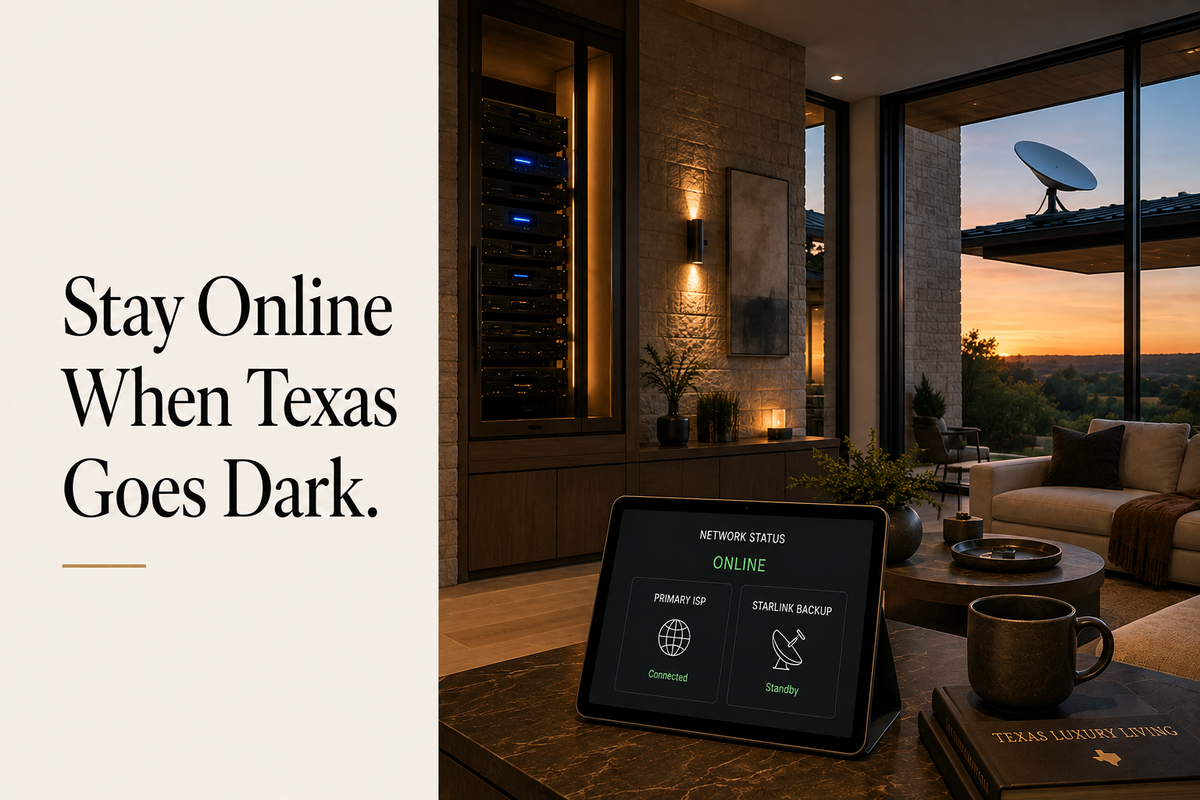
The Texas Reality
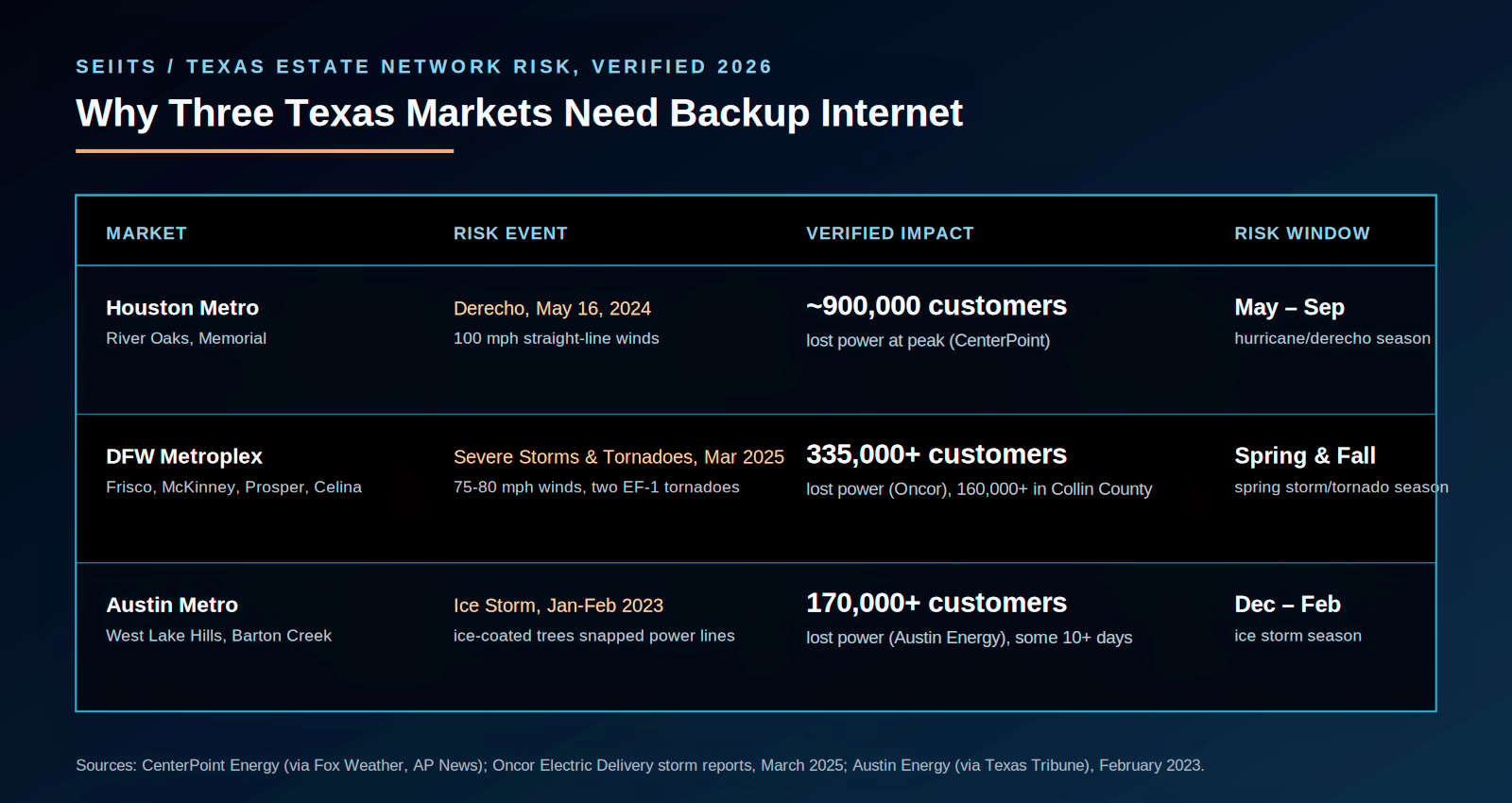
May 16, 2024. A derecho with sustained winds near 100 miles an hour tore through the Houston metro in under an hour.
CenterPoint later confirmed a peak of roughly 900,000 customers without power across its Houston-area service territory. AT&T and Verizon both reported service interruptions. Fiber lines, buried and aerial, came down across Memorial, River Oaks, and The Woodlands.
Losing internet for two days is an inconvenience for most households. For an estate running Control4 automation, two dozen cloud-connected cameras, a trading desk that lives on video calls, and a family that relies on WiFi calling because cell coverage is weak out past the loop, it's closer to an operational failure.
Starlink doesn't run on the infrastructure that goes down in storms like that one. It talks to satellites. While crews were still repairing severed fiber two days later, Starlink terminals with power were already back online.
This article covers why that matters for Texas luxury homeowners, what a real backup setup costs as of 2026, how automatic failover actually works, and how SEIITS builds it into a managed estate network.
What Actually Stops Working When Your Internet Goes Down
Most homeowners haven't run this math. A modern smart estate depends on internet far more than it looks like it does on paper.
|
System |
Internet Dependent? |
What Fails During an Outage |
|
Control4 / Crestron remote
app |
Yes, cloud-dependent |
App stops working from
outside the home. Some local scenes may still run. |
|
Cloud NVR camera recording |
Yes |
Cameras stop uploading.
Footage is lost if no local NVR is configured. |
|
Cloud-based smart locks |
Partially |
Remote lock and unlock
fails. The physical keypad usually still works. |
|
Video doorbell (Ring, Nest) |
Yes |
Live view, motion alerts,
and remote answer all go offline. |
|
Voice assistants (Josh.ai,
Alexa) |
Mostly |
Voice commands fail. Some
local processing on Josh.ai may hold. |
|
Work-from-home / video
calls |
Yes |
Total loss of productivity
for anyone working from the house that day. |
|
Streaming and whole-home
audio |
Yes |
Home theater and
distributed audio drop offline. |
Add those up for a fully built-out estate and a two-day outage isn't an inconvenience. It's a failure of the home's core technology, not a footnote to a storm.
Cloud cameras going dark is the row homeowners feel first. That's a separate but related fix, covered in the SEIITS guide to local NVR storage and security camera continuity.
Starlink Standby Mode, Explained Honestly
SpaceX has changed Starlink's plan terms five separate times in 2026, and Standby Mode took the brunt of it. Understanding the current terms matters more than the marketing pitch most integrators are still using.
|
Spec |
Standby Mode |
Residential 100 Mbps |
Residential MAX |
|
Monthly cost |
$10/month |
$55/month |
$130/month |
|
Speed |
500 Kbps, throttled |
Up to 100 Mbps |
Up to 300+ Mbps |
|
Data cap |
Unlimited at 500 Kbps |
Unlimited |
Unlimited |
|
In-motion use |
No, blocked since March
2026 |
No |
No |
|
Best for |
Stationary backup dish |
Primary connection, budget
tier |
Primary connection, top
tier |
|
Hardware |
Standard Kit (~$350) or
Mini (~$200-250) |
Same |
Same |
Three changes landed this year, and none of them favor the backup-internet use case. In March, SpaceX blocked in-motion use on the Standby plan. In April, it dropped the demand-surcharge shield that used to protect reactivating customers from congestion pricing. In May, the monthly fee doubled from $5 to $10. None of these are dealbreakers for a rooftop dish that never leaves the estate, but the old $5-a-month pitch is now simply wrong.
The bigger risk predates all three changes and gets skipped in most write-ups. Starlink's own terms are direct about it: pausing into Standby Mode does not reserve a spot on the Residential plan. If the local area shows as at capacity on Starlink's coverage map when someone tries to reactivate, that reactivation can stall for weeks.
For DFW and Austin, where Starlink's network keeps getting more crowded every quarter, that's a real risk worth planning around, not a footnote.
|
SEIITS Recommendation For
estates with genuine internet dependency, meaning work-from-home use, active
security monitoring, or Control4 or Crestron automation, run Starlink on a
full Residential plan starting at $55 a month as a permanent second
connection. A two-day outage costs most professionals working from home more
than a full year of that fee. |
Hardware: What a Backup Dish Actually Costs
|
Hardware |
Cost* |
Best For |
|
Starlink Standard Kit |
roughly $350 one-time |
Permanent roof or pole
mount, primary backup |
|
Starlink Mini |
roughly $200 to $250
one-time |
Portable standby, secondary
property |
|
Starlink Performance Kit |
roughly $2,000 one-time |
Heavy tree canopy or
complex rooflines |
Dish placement on a Texas estate needs a clear view of the northern sky. The Starlink app includes an obstruction checker. On lots with mature oak canopy or a covered motor court blocking the view, a roof or pole mount above the obstruction line is usually required.
The same obstruction and coverage issues that create WiFi dead zones in a Texas luxury home apply to dish placement. If the primary network already has coverage gaps, it's worth fixing both at once.
|
Not
sure whether Starlink failover is right for the estate, or how it would sit
alongside an existing UniFi or Crestron network? SEIITS runs a full network
assessment that includes backup connectivity planning. Book one free at seiits.com/assessment. |
Failover Hardware: UDM Pro, Peplink, and Cradlepoint
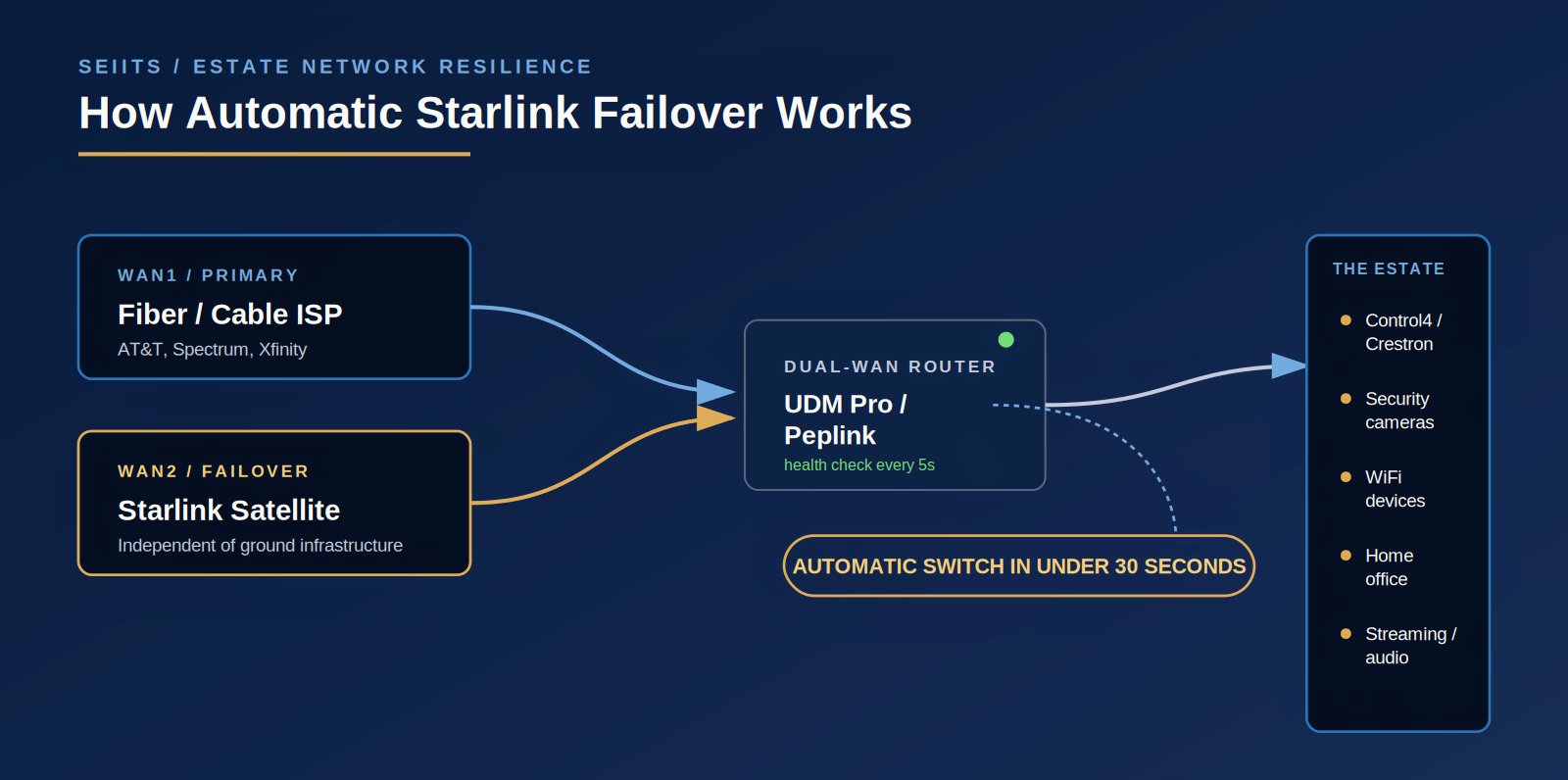
A Starlink dish on the roof isn't automatic failover by itself. That takes a router built to watch both connections and switch when one drops.
|
Router |
Cost* |
Failover Speed |
Best For |
|
Ubiquiti UDM Pro (or
current UniFi gateway) |
roughly $380 to $600 |
Under 30 seconds |
Estates already on UniFi.
Cleanest integration, no extra hardware. |
|
Peplink Balance 20X |
roughly $800 and up |
Under 10 seconds |
Work-from-home
professionals who can't afford a dropped video call. |
|
Cradlepoint R1900 |
roughly $1,500 to $3,500,
sold bundled with a NetCloud subscription |
Under 5 seconds |
Multi-property owners or
commercial-grade uptime needs. |
|
Ubiquiti Cloud Gateway
(entry tier) |
roughly $130 to $200 |
Under 30 seconds |
Smaller estates on a budget
with lighter automation. |
How SEIITS Wires It Into a UniFi Network
● The Starlink dish connects through its Ethernet adapter, set to bypass mode so it hands off a direct connection instead of routing through its own hardware.
● That cable plugs into the UDM Pro's WAN2 port. The primary ISP stays on WAN1.
● Failover rules go into the UniFi dashboard: WAN1 primary, WAN2 as backup, with health-check pings set to catch a failure inside 30 seconds.
● Traffic switches to Starlink automatically on failure and switches back once WAN1 is restored. Devices on the network don't need to do anything.
● SEIITS sets load-balancing rules so Control4 or Crestron traffic gets priority over speed during the switch.
On an estate that already runs a UDM Pro, total configuration time runs an hour or two, and the only new hardware cost is the Starlink kit itself.
Adding a second WAN connection is also the right moment to review network segmentation. SEIITS covers this in the guide to securing home WiFi and VLAN setup for Texas smart homes, and for estates still running older access points, in the Wi-Fi 7 installation guide.
Automatic Beats Manual, and It Isn't Close
|
Factor |
Manual Failover |
Automatic Failover |
|
Response time |
Minutes to hours, requires
someone home |
Under 30 seconds, no one
has to notice |
|
Smart home continuity |
Control4 or Crestron drops
before anyone can react |
Stays online, automation
scenes keep running |
|
Camera continuity |
Recording stops until
someone switches manually |
Upload continues through
the switch |
|
While traveling |
Can't switch remotely if
primary fails |
Works whether anyone is
home or in Aspen |
That last row decides it for a lot of Texas buyers. Plenty of these estates sit empty for weeks at a stretch. Automatic failover keeps the cameras recording and the estate reachable with nobody there to flip a switch.
Where This Actually Shows Up: Three Texas Failure Patterns
Houston: Hurricane and Derecho Season, May Through September
River Oaks, Memorial, and Tanglewood see the same pattern every summer: severe wind events damage utility infrastructure and fiber lines faster than crews can restore them. During the May 2024 derecho, Starlink terminals with power stayed connected while ground-based internet stayed down for days.
The pairing that actually works here is Starlink failover plus a UPS on the network closet. The UPS keeps the router and dish alive through short power blips. For longer outages, a generator with an automatic transfer switch keeps the whole estate, network included, running.
DFW: Severe Storm and Tornado Season
DFW doesn't need a hypothetical to make this case. A single storm system on March 4, 2025 brought straight-line winds of 75 to 80 mph and two EF-1 tornadoes through the metroplex. Oncor reported a peak of more than 335,000 customers without power, and more than 160,000 of those outages were in Collin County alone, the same county that includes Frisco, McKinney, Prosper, and Celina. Restoration in the hardest-hit areas ran into a second and third day.
Fast-growing suburbs carry a second, quieter risk on top of that. Active construction corridors see fiber lines cut by roadwork more often than older, built-out neighborhoods do, though there's no single published citywide figure for how frequently that happens. Either way, a severed fiber line and a downed transmission tower have the same result for a network closet, and Starlink answers both the same way, since it has no buried line to sever.
Austin: Ice Storm Season, December Through February
Austin's clearest example is the ice storm that hit the week of January 30, 2023, not the more widely covered 2021 crisis. Ice-coated trees took down power lines across the city, and Austin Energy reported more than 170,000 customers without power at the peak, some out for ten days or more, from local ice damage rather than a statewide grid failure. Winter Storm Uri in February 2021 was worse still, cutting power to more than 4.5 million Texans statewide, Austin included, for as long as four days in the hardest-hit areas.
Starlink satellites orbit at 340 to 550 kilometers, well above the weather, and the dish has a built-in heater for ice and snow that ground equipment doesn't have. In West Lake Hills and Barton Creek, where the mature tree canopy is exactly what brings lines down in an ice event, that satellite independence is closer to primary resilience than backup.
How SEIITS Builds This Into an Estate Network
|
Integration Task |
SEIITS Approach |
|
Dish placement |
Obstruction survey using
the Starlink app plus a physical walk-through, roof or pole mount spec'd to
match |
|
Bypass mode setup |
Configured and tested
before the dish ever connects to the estate network |
|
Dual-WAN configuration |
Failover rules, health
checks, and alerting set up on UDM Pro or Peplink |
|
Smart home continuity
testing |
A simulated failover event
run against Control4 or Crestron before calling it done |
|
Camera continuity check |
Confirms local NVR is the
primary recorder and cloud upload resumes after failover |
|
Ongoing monitoring |
Failover alerts sent to
both SEIITS and the homeowner when the connection switches |
What's included depends on membership tier. Elite covers the Starlink integration, configuration, and monitoring setup. Prestige adds SpeedFusion bonding on Peplink for a zero-drop switch, plus quarterly failover tests. Full tier details are at seiits.com/memberships, and the underlying smart home technology consulting service is at seiits.com/consulting.
For homeowners still choosing between platforms before any of this gets built, the SEIITS guide on finding a home automation company in Dallas, Austin, or Houston is the right starting point.
Where SEIITS Serves
Houston: River Oaks, Memorial, Tanglewood, The Woodlands, Sugar Land. DFW: Highland Park, University Park, Preston Hollow, Southlake, Westlake, Frisco, McKinney, Prosper, Celina. Austin: West Lake Hills, Rollingwood, Barton Creek, Lakeway. Hill Country ranch and lake properties where fiber never reached in the first place.
|
An
estate runs on its internet connection. Treat it like infrastructure, not an
afterthought. SEIITS builds Starlink failover into Texas luxury estate
networks with automatic switching, smart home continuity, and ongoing
monitoring. Start with a free Home Network Assessment at seiits.com/assessment. |
Frequently Asked Questions
Can Starlink be used as backup internet at home?
Yes. Starlink runs on satellites instead of buried fiber or utility poles, so it stays online when ground infrastructure is damaged by storms, construction accidents, or equipment failure. Standby Mode keeps a dish network-ready for $10 a month at a throttled 500 Kbps. For estates with real internet dependency, a full Residential plan starting at $55 a month, run as a permanent second connection, is the more reliable setup.
What is Starlink Standby Mode, and is it good for home backup?
Standby Mode keeps a Starlink dish active on the network with unlimited data throttled to 500 Kbps, for $10 a month as of mid-2026. That speed handles email, basic browsing, and WiFi calling, but not video calls or streaming. Upgrading to full speed takes seconds through the app. The catch: Standby Mode doesn't reserve a spot on the Residential plan, so reactivation can stall if the local area is showing as at capacity.
What router is needed for automatic Starlink failover?
A dual-WAN router that monitors both connections and switches when one fails. For estates already on Ubiquiti UniFi, the UDM Pro (roughly $380 and up) adds Starlink as WAN2 and switches in under 30 seconds with no extra hardware. For homes that can't afford a dropped video call, Peplink Balance routers (roughly $800 and up) switch in under 10 seconds. Cradlepoint (roughly $1,500 and up, sold bundled with a subscription) suits multi-property owners. SEIITS configures all three.
Does Starlink actually work during Texas storms?
Starlink satellites orbit at 340 to 550 kilometers, above the weather, and the dish has a built-in heater for ice and snow buildup. During Winter Storm Uri and the May 2024 Houston derecho, Starlink terminals kept working while AT&T, Spectrum, and Verizon reported widespread outages. Heavy rain can slow the signal, but that's typically a speed hit, not a full outage.
How does Starlink failover affect a Control4 or Crestron system?
Both platforms depend on internet access for remote app control, cloud services, and firmware updates, and both lose those features without a connection. With automatic failover on a dual-WAN router, the switch happens fast enough that the smart home platform stays connected. SEIITS tests this with a simulated failover before signing off on an install. Some automation scenes tied to outside cloud services may hiccup for the roughly 30-second window it takes to switch.
What does adding Starlink backup actually cost for a Texas luxury estate?
Hardware runs roughly $350 for the Standard Kit as of 2026, plus $25 for an Ethernet adapter if it isn't included. No new router is needed on estates already running a UDM Pro. SEIITS configuration for a new failover build on an existing UniFi network runs $350 to $650, covering mounting, cabling, dual-WAN setup, and continuity testing. Add the ongoing plan, $10 a month for Standby or $55 and up for Residential. All-in year-one cost lands somewhere around $1,050 to $1,550 depending on the plan chosen.
Should Starlink be the primary connection or just the backup?
For most Texas luxury estates already served by AT&T Fiber, Google Fiber, or Spectrum, Starlink works best as the backup. Fiber still wins on latency, roughly 5 to 15 milliseconds against Starlink's 25 to 60, and on sustained speed. Starlink's advantage is independence from ground infrastructure. For rural Texas, Hill Country ranches, and lake houses where fiber never arrived, Starlink is the primary connection, not the backup.

Comments ()