
Ethernet Drops Per Room: 2026 Texas Custom Home Guide
Key Takeaways:
- Cat6A (not Cat6) is the correct spec for 2026 Texas luxury builds - supports 10 GbE to full 100 meters per TIA-568-C.2
- Retrofitting a single Ethernet drop after drywall costs $300-$500 in Texas vs $80-$120 during framing
- ICF and SIP wall construction - increasingly common in Texas Hill Country and energy-efficient builds - makes retrofit drilling significantly harder and more expensive
- Texas storm belt grounding is a non-negotiable spec item: every network closet needs proper surge protection and bonded grounding
- The network closet must be in conditioned space - garage placement in Texas summer heat kills networking equipment
- Free Home Technology Assessment includes a full room-by-room prewire specification- book at seiits.com/assessment
The number one regret in luxury custom homes is not a finish selection. It is a missed wire.
In Frisco's Phillips Creek Ranch and Southlake's Carillon, the conversation SEIITS has most often with new homeowners goes like this: 'The home is stunning. But the theater room has no conduit to the projector location, the primary suite has one Ethernet drop, and the outdoor kitchen has no network access at all.'
All of those wires cost $80-$120 each during framing. Each one costs $300-$500+ to retrofit after drywall - if the wall type even allows it.
This guide gives Texas builders, architects, and luxury homeowners the exact per-room specification needed to avoid that conversation. Room by room, cable by cable, with 2026 pricing and Texas-specific construction notes.
Why Cat6 Is Dead for Texas Luxury Builds in 2026
Many builders still spec Cat6. Their low-voltage subs still quote Cat6. This is a mistake that will cost homeowners money within five years.
Cat6A vs Cat6: The Distance Problem
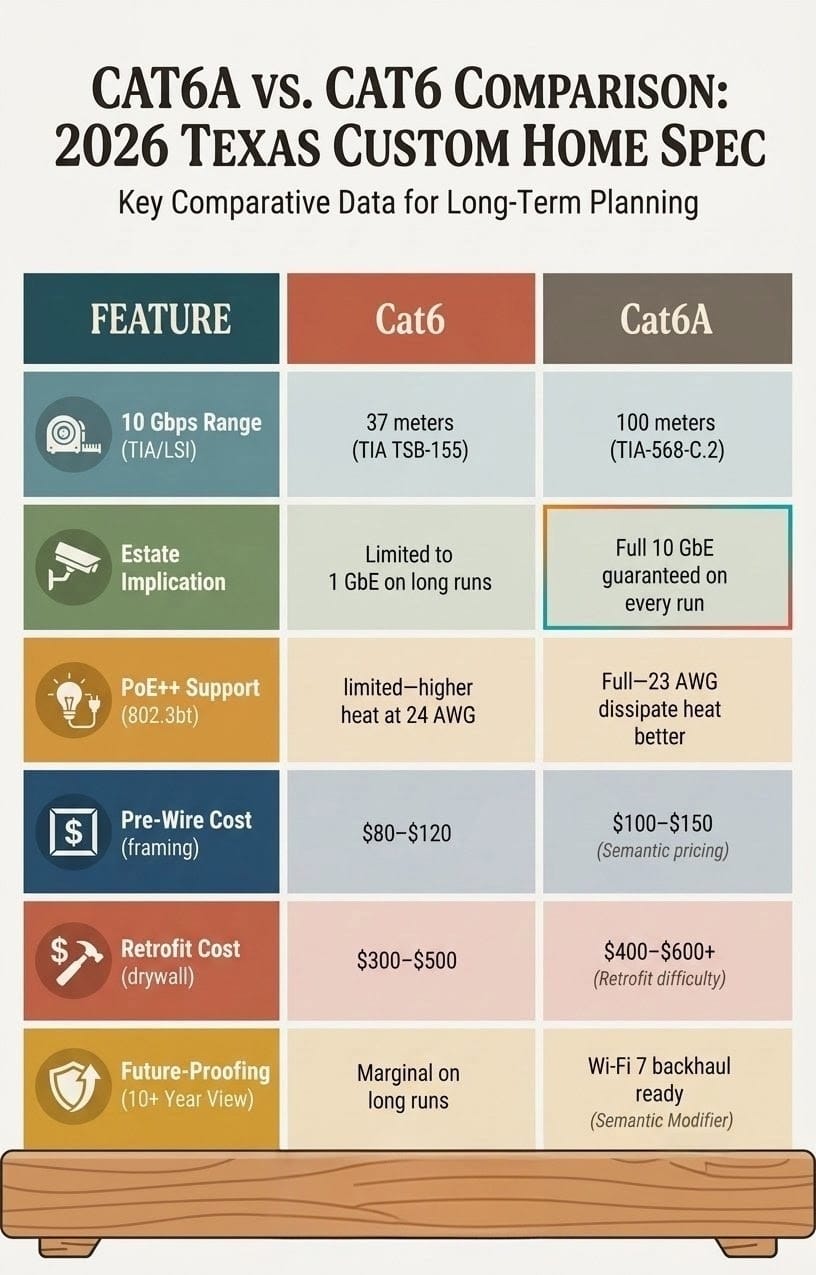
Cat6 supports 10 Gbps to approximately 37 meters under the stricter TIA TSB-155 standard. Beyond that, alien crosstalk degrades the signal. (Source: TIA-568-C.2 standard, tiaonline.org)
A 10,000 sq ft Texas estate has cable runs that regularly exceed 37 meters from network closet to remote rooms. Cat6 at those distances is not a 10 Gbps cable. It is a 1 Gbps cable.
Cat6A supports 10 Gbps to the full 100 meters. Every run. Without exception. That is the correct spec for a luxury estate where runs to detached structures, outdoor zones, and far wings regularly hit 50-90 meters.
Spec | Cat6 | Cat6A | Implication for Texas Estates |
10 Gbps range | 37 meters (TIA TSB-155) | 100 meters (TIA-568-C.2) | Long runs to far wings, outdoor zones, guest houses require Cat6A |
PoE++ support (802.3bt) | Limited - higher heat at 24 AWG | Full support - 23 AWG conductors dissipate heat better | Luxury PoE devices (PTZ cameras, enterprise APs, Crestron PoE gear) need Cat6A |
Cost per foot (bulk) | $0.20-$0.30 | $0.35-$0.55 | Minimal difference at framing - significant cost to retrofit later |
Cost per drop installed (framing) | $80-$120 | $100-$150 | $20-$30 premium per drop during construction |
Cost per drop installed (retrofit) | $300-$500 | $400-$600+ | 3-5x premium after drywall regardless of cable type |
Future-proofing (10+ year view) | Marginal on long runs | Full 10 GbE on every run, Wi-Fi 7 backhaul ready | Cat6A is the correct 20-year spec for estate construction |
Builder Note: The material cost difference between Cat6 and Cat6A on a 60-drop estate is approximately $500-$900. The cost to replace Cat6 with Cat6A after drywall - if homeowners decide to upgrade - is $18,000-$35,000 in labor alone. Specify Cat6A from the start. |
Ethernet Drops Per Room: The 2026 Texas Spec Sheet
The following specifications are based on SEIITS deployments across luxury estates in Frisco, Plano, Southlake, Westlake, Highland Park, West Lake Hills, and River Oaks. All drops are Cat6A unless noted.
Primary Suite
Location | Drops | Cable Type | Purpose |
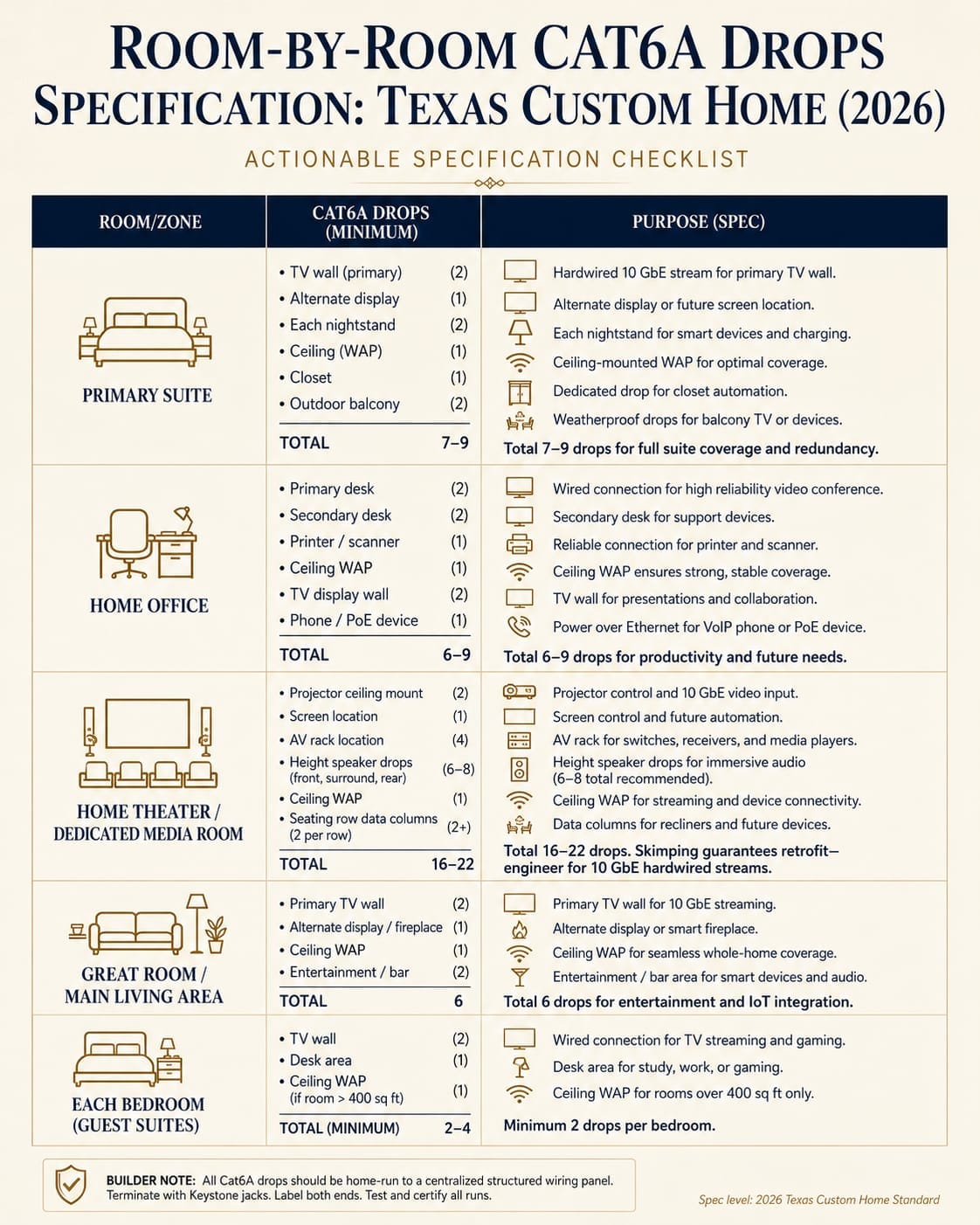
TV wall (primary location) | 2 | Cat6A | Smart TV network, streaming device |
TV wall (alternate/reading nook) | 1 | Cat6A | Secondary display or future flex |
Each nightstand location | 1 each | Cat6A | Smart lamp, phone charger hub, device charging |
Ceiling (WAP location) | 1 | Cat6A | Dedicated wireless access point - home-run to closet |
Primary closet | 1 | Cat6A | Smart lighting keypad, future flex |
Outdoor balcony/patio off primary | 2 | Cat6A | Outdoor TV, speaker control, WAP for coverage |
Total: 7-9 drops. Most builders spec 1-2. The gap shows up immediately at move-in.
Home Theater / Dedicated Media Room
The theater is the most cable-intensive room in the estate. Skimping here guarantees a costly retrofit.
Location | Drops | Cable Type | Purpose |
Projector ceiling mount | 2 | Cat6A | IP control + dedicated video stream |
Screen location (motorized drop) | 1 | Cat6A | IP control for motorized screen |
AV rack location | 4 | Cat6A | AV receiver IP, streaming devices, processor control, NAS link |
Each speaker location (Atmos heights) | 1 each (6-8 total) | Cat5e or Cat6 | Control4/Crestron speaker control where applicable |
Ceiling WAP | 1 | Cat6A | Isolated SSID for media room devices |
Seating row power/data columns | 2 per row | Cat6A | Seat control panels, device charging hubs |
Total: 16-22 drops. A theater done right is expensive to pre-wire and almost impossible to retrofit in a finished room with acoustic treatment.
Home Office
The home office is where Ethernet drops matter most. Wireless in a video conference environment creates reliability and security risks.
Location | Drops | Cable Type | Purpose |
Primary desk (workstation) | 2 | Cat6A | Dual monitor workstation, NAS or backup drive |
Secondary desk or credenza | 2 | Cat6A | Second workstation, guest laptop |
Printer/scanner location | 1 | Cat6A | Network printer - wired is faster and more reliable |
Ceiling WAP | 1 | Cat6A | Dedicated office WAP on isolated business VLAN |
TV/display wall | 2 | Cat6A | Video conferencing display, presentation screen |
Phone/PoE device location | 1 | Cat6A | IP phone, PoE desk device |
Total: 6-9 drops. For homeowners who run businesses from home, add 2 drops to a sub-panel location for a small dedicated rack with UPS.
Great Room / Main Living Area
Location | Drops | Cable Type | Purpose |
Primary TV wall | 2 | Cat6A | Smart TV, streaming, or AV receiver |
Secondary display/fireplace wall | 1 | Cat6A | Mirror TV or future display |
Ceiling WAP (main living zone) | 1 | Cat6A | Primary social WiFi access point |
Entertainment/bar area | 2 | Cat6A | Display, music control, mini-fridge IoT |
Total: 6 drops. Great rooms in Highland Park and Preston Hollow estates are large. One WAP drop is the minimum - consider 2 for rooms over 1,000 sq ft.
Kitchen and Butler's Pantry
Location | Drops | Cable Type | Purpose |
Under-counter display or iPad location | 1 | Cat6A | Recipe display, home control interface |
Refrigerator location | 1 | Cat6A | Smart refrigerator network connection |
Butler's pantry (beverage/wine system) | 1 | Cat6A | Smart refrigeration IoT |
Ceiling WAP (kitchen/dining zone) | 1 | Cat6A | Coverage for kitchen devices and dining area |
Total: 4 drops. Kitchen IoT device counts continue growing. A wired connection for the refrigerator and primary display eliminates WiFi congestion in one of the highest-traffic network areas.
Each Bedroom (Guest Suites, Children's Rooms)
Location | Drops | Cable Type | Purpose |
TV wall | 2 | Cat6A | Smart TV, streaming device, gaming console |
Desk or homework area | 1 | Cat6A | Wired workstation - significantly better gaming/streaming |
Ceiling WAP (if large room or far wing) | 1 | Cat6A | Dedicated WAP only in rooms over 400 sq ft or signal-challenged locations |
Total: 2-4 drops per bedroom. 2 is the minimum. 4 is the right spec for any room over 300 sq ft or used as a home office/study.
Network Closet / Structured Media Room
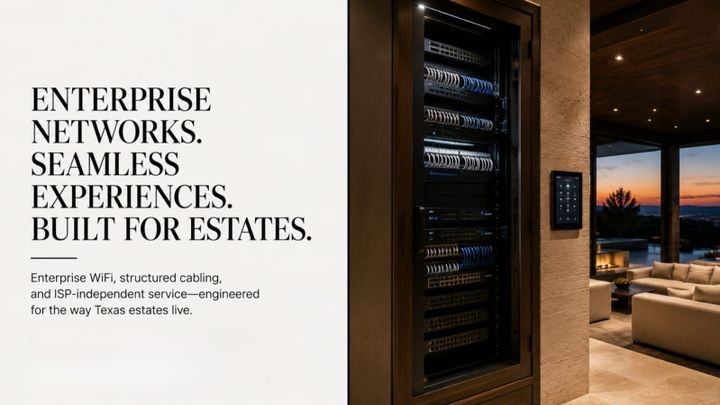
This is the most important space in the home network. Its placement determines whether the system works reliably for twenty years.
Spec Item | Requirement | Texas-Specific Note |
Location | Central hallway, conditioned space with HVAC supply | NEVER in garage - Texas summer temps kill networking equipment above 104 degrees F operating limit |
Size | Minimum 24 inches deep, 36 inches wide, 84 inches tall for standard estates | Larger estates (10,000+ sq ft) need a 6x8 ft dedicated room for full rack + UPS |
Rack size | 12U minimum; 24U for estates with NVR, NAS, and full AV integration | Allow 20% empty rack space for future growth |
Power circuits | 2 dedicated 20A circuits minimum | Add a third 20A for UPS to separate battery backup from continuous load |
Cooling | HVAC supply duct or dedicated mini-split for dedicated rooms | Active cooling required - passive ventilation insufficient in Texas summers |
Grounding | Bonded ground bar connected to building ground system | Texas storm belt: whole-home surge protection (Eaton or Leviton) required at panel + secondary at network closet |
Cable entry | 2-inch conduit stub from attic for horizontal cable distribution | Install before insulation is blown - nearly impossible to add later |
Outdoor Zones: Patio, Pool, Motor Court, Outdoor Kitchen
Texas outdoor living is aggressive. These zones need real infrastructure - weatherproof connectors, conduit protection, and PoE devices rated for Texas UV and heat.
Zone | Drops | Cable Spec | Notes |
Covered patio TV location | 2 | Cat6A in outdoor-rated conduit | HDMI conduit stub-out also recommended |
Outdoor kitchen | 2 | Cat6A | Smart appliances, outdoor display, ambient music controller |
Pool/spa control area | 1 | Cat6A | Smart pool controller, thermometer, water chemistry IoT |
Outdoor WAP (patio/pool deck) | 1 | Cat6A + outdoor-rated PoE AP | Ubiquiti UniFi U6 Mesh IP67 rated - Texas UV resistant |
Motor court / gate entry | 2 | Cat6A | Video intercom, access control reader, gate camera |
Perimeter camera soffit locations | 1 each | Cat6A per camera location | PoE camera - hardwire every location, no wireless cameras in estate security |
Detached garage / guest house | 4+ (home run to main network closet) | Cat6A or fiber if over 100m | Add a sub-panel/switch if structure is over 100 meters from main closet |
Texas-Specific Prewire Considerations
These are the items most national guides skip - and the ones most likely to create expensive problems in Texas luxury construction.
ICF and SIP Wall Construction
Insulated Concrete Forms (ICF) and Structural Insulated Panels (SIP) are increasingly popular in Texas for their energy efficiency and storm resistance. They are also significantly harder to retrofit cabling through than standard wood-frame construction.
ICF walls are concrete cores with foam insulation. Drilling a cable path requires a specialty bit and substantially more time than a standard wall penetration. Retrofit costs in ICF construction run 2x to 3x the standard retrofit rate.
If the build uses ICF or SIP construction, specify all cable runs in detail before the forms are poured. After that point, every missed wire is a masonry problem.
Texas Storm Belt Grounding
The DFW Metroplex ranks among the highest-frequency lightning-strike areas in the continental United States. A direct or near-miss lightning strike on an estate with an improperly grounded network creates a surge that can destroy every piece of networking equipment in the rack simultaneously.
The correct specification for any Texas luxury build includes three layers of protection. First, a whole-home surge protector bonded to the main electrical panel. Second, a bonded ground bar in the network closet connected to the building's grounding electrode system. Third, a quality UPS (APC or Eaton) for the network rack itself, providing battery backup and additional surge filtration.
The NEC provides grounding requirements for low-voltage systems. SEIITS follows these standards on every Texas installation.
Conduit and Smurf Tube: The $80 Decision That Saves Thousands
Smurf tube is the contractor nickname for flexible ENT (Electrical Nonmetallic Tubing) conduit - the blue corrugated tubing that acts as a protected pathway for cables inside walls.
Installing 1-inch smurf tube from the network closet through walls to junction points during framing costs $2-$5 per linear foot installed. It creates a protected cable pathway that allows cables to be pulled, replaced, or added without touching drywall.
Skipping smurf tube saves approximately $800-$2,000 on a full estate pre-wire. The decision costs $15,000-$30,000 in retrofit labor the first time a major cable run needs to change or be added.
SEIITS specifies smurf tube on every conduit run from network closet to ceiling distribution points, and on all long horizontal runs exceeding 50 feet.
Neutral Wire Requirement for Smart Switches
Lutron RadioRA 3, HomeWorks QS, and other professional-grade lighting control systems require a neutral wire at every keypad location. Standard electrical wiring in many Texas builder-grade homes does not include neutral wires at switch boxes.
Retrofitting neutral wires to existing switch boxes after drywall requires rewiring portions of the electrical circuit - an electrician's job that adds $100-$300 per switch location.
The correct specification: call out neutral wire at every single switch box location in the electrical plans before framing begins. The cost during rough-in is zero - it is simply included in the electrician's work. The cost after drywall is significant.
Real Cost: Prewire $5K-$12K vs Retrofit $18K-$40K+
These figures reflect DFW, Austin, and Houston luxury market rates as of 2026. Source: Data Wire Solutions 2026 benchmarks confirm $100-$150 per Cat6A drop during open-wall construction for residential projects.
Estate Size | Total Drops (Typical) | Pre-Wire Cost (Framing) | Retrofit Cost (Post-Drywall) | Retrofit Feasibility |
4,000-6,000 sq ft | 40-60 drops | $4,000-$7,000 | $12,000-$25,000 | Possible but expensive; stone/brick walls add difficulty |
6,000-8,000 sq ft | 60-80 drops | $6,000-$10,000 | $18,000-$32,000 | Difficult; ICF or stone walls may prevent some runs entirely |
8,000-12,000 sq ft | 80-110 drops | $9,000-$14,000 | $25,000-$42,000 | Major runs may be physically impossible; conduit paths gone |
12,000+ sq ft / multi-structure | 110-150+ drops | $14,000-$22,000 | $40,000-$70,000+ | Multi-structure runs require trenching if conduit not installed |
These costs cover Cat6A cable, labor for routing and termination, patch panel and structured media panel, and basic testing. They do not include specialty items like fiber backbone, outdoor conduit trenching, or lightning protection.
The 10 GbE Future-Proofing Case
AT&T Fiber and Google Fiber now offer multi-gigabit tiers in DFW and Austin. The next ISP technology cycle will push gigabit-per-second to individual devices, not just to the home.
Cat6A installed today handles that future completely. Cat6 on long runs does not. The incremental cost difference during framing is $20-$30 per drop. On a 70-drop estate, that is $1,400-$2,100.
Replacing 70 drops of Cat6 with Cat6A after drywall costs $25,000-$40,000 in labor alone - if the walls allow it.
How SEIITS Handles New Construction Prewire
SEIITS engages new construction projects at the design development phase - before the architect's drawings are finalized.
The deliverable is a Technology Specification Document: a room-by-room written spec of every cable, every drop location, every conduit path, and every closet requirement. It goes to the architect, the general contractor, the electrician, and the low-voltage sub.
No contractor guesses. No drops missed because no one thought to specify them.
SEIITS Architect Membership Phase | What Gets Done | Timing |
Design Development | Technology Specification Document delivered; per-room drop count, cable types, conduit paths, network closet spec | Before permit submission |
Electrical Coordination | SEIITS marks up electrical plans with neutral wire locations, dedicated circuits, and panel sizing for tech loads | During electrical plan review |
Framing / Rough-In | On-site visit during rough-in; verifies every location against spec; catches deviations before drywall | During framing phase |
Pre-Drywall Walk | 100% verification of all drops, conduit, and grounding against Technology Specification Document | Before drywall close - critical milestone |
Trim-Out and Commission | Install active equipment, configure VLANs, integrate with smart home platform, certify network performance | After occupancy permit |
Architect Membership details and service areas: seiits.com/memberships.
Ready to specify your Texas custom home network before framing starts? SEIITS delivers a complete room-by-room prewire spec, builder coordination, and on-site verification. Start with a free Home Technology Assessment at seiits.com/assessment. |
Where SEIITS Provides New Construction Prewire Specs in Texas
- DFW: Frisco (Phillips Creek Ranch, Starwood, The Bridges, Stonebriar), Plano (Willow Bend, Kings Gate, Shoal Creek), Allen, McKinney, Prosper, Celina
- DFW Luxury Enclaves: Southlake (Carillon, Vaquero), Westlake, Colleyville, Trophy Club, Keller
- Dallas Core: Highland Park, University Park, Preston Hollow, Bluffview, Devonshire
- Austin Metro: West Lake Hills, Rollingwood, Barton Creek, Bee Cave, Lakeway
- Houston Metro: River Oaks, Tanglewood, Memorial, The Woodlands, Sugar Land
- Hill Country: Boerne, Dripping Springs, Wimberley (ICF and limestone construction expertise)
Frequently Asked Questions
How many ethernet drops per room does a luxury home need?
The SEIITS 2026 spec for Texas luxury estates: primary suite 7-9 drops, home theater 16-22, home office 6-9, great room 6, kitchen 4, each guest bedroom 2-4, outdoor zones 2-3 per area. Most builders spec 1-2 drops per room. That is sufficient for a rental property. For a luxury estate with smart home integration, whole-home audio, security cameras, and a home office, 1-2 drops per room guarantees expensive retrofits within two to three years of move-in.
Is Cat6A worth it for new construction in Texas?
Yes, without exception for luxury estates. Cat6 supports 10 Gbps only to 37 meters under the TIA TSB-155 standard. Texas luxury estates have many runs that exceed that distance. Cat6A supports 10 Gbps to the full 100 meters, handles PoE++ for enterprise access points and cameras, and costs only $20-$30 more per drop during framing. The same upgrade after drywall costs $400-$600 per drop in retrofit labor. Cat6A is the correct 20-year specification for any luxury build.
How much does it cost to prewire ethernet in a new home in Texas?
Professional Cat6A prewire for a Texas luxury estate costs $4,000-$7,000 for homes under 6,000 sq ft and $9,000-$14,000 for estates 8,000-12,000 sq ft. This includes cable, termination, patch panel, and structured media panel. The same work after drywall costs $18,000-$42,000 and may not be physically possible in stone or ICF construction. Pre-wire during framing is the correct investment regardless of build cost.
What is smurf tube and do I need it in my new home?
Smurf tube is the contractor name for flexible ENT (Electrical Nonmetallic Tubing) conduit - a corrugated plastic sleeve that creates a protected cable pathway inside walls. Installing it during framing costs $2-$5 per linear foot. It allows cables to be pulled, replaced, or added later without cutting drywall. On a full luxury estate, smurf tube on primary runs adds $800-$2,000 to the pre-wire cost and saves $15,000-$30,000 the first time a cable needs to be changed. SEIITS specifies smurf tube on all primary conduit runs and long horizontal cable paths.
Where should the network closet be placed in a Texas luxury home?
The network closet must be in a conditioned space with HVAC supply air, not in a garage or unconditioned utility room. Texas summer temperatures push garage interiors above 120 degrees F, well beyond the 104 degrees F maximum operating temperature of most networking equipment. The ideal location is a central hallway closet or small room with HVAC supply air, proximity to the attic cable distribution point, and access to dedicated 20A electrical circuits. For estates over 10,000 sq ft, a 6x8 ft dedicated technology room with a small dedicated cooling unit is the correct specification.
Why do Texas luxury homes need special lightning grounding for their network?
The DFW Metroplex is one of the highest-frequency lightning-strike areas in the United States. A near-miss strike on a home with an improperly grounded network creates a surge that destroys all connected networking equipment simultaneously. The correct Texas specification includes a whole-home surge protector at the main electrical panel, a bonded ground bar in the network closet tied to the building's grounding electrode system, and a quality UPS for the network rack. These three layers together prevent the most common catastrophic network failure in Texas luxury estates. NEC standards govern low-voltage system grounding requirements.
Can I add ethernet drops after my Texas home is built?
Yes, but at 3x to 5x the cost of pre-wire and with meaningful limitations. Retrofitting a Cat6A drop after drywall runs $300-$500 per drop in standard construction and $400-$600+ in stone, brick, or ICF construction. Some runs - particularly those requiring conduit paths through concrete slabs or stone exterior walls - may be physically impossible without major structural work. The case for pre-wire is overwhelming in any estate over $1 million in construction value.
Comments ()