
Smart Home Devices Not Working? Here's When to Call a Pro in Texas (2026)
Smart home devices failing in your Texas estate? Connectivity drops, automation glitches, and security gaps all have a clear DIY limit. This guide tells you exactly when to stop troubleshooting and call a professional - before it costs you more.
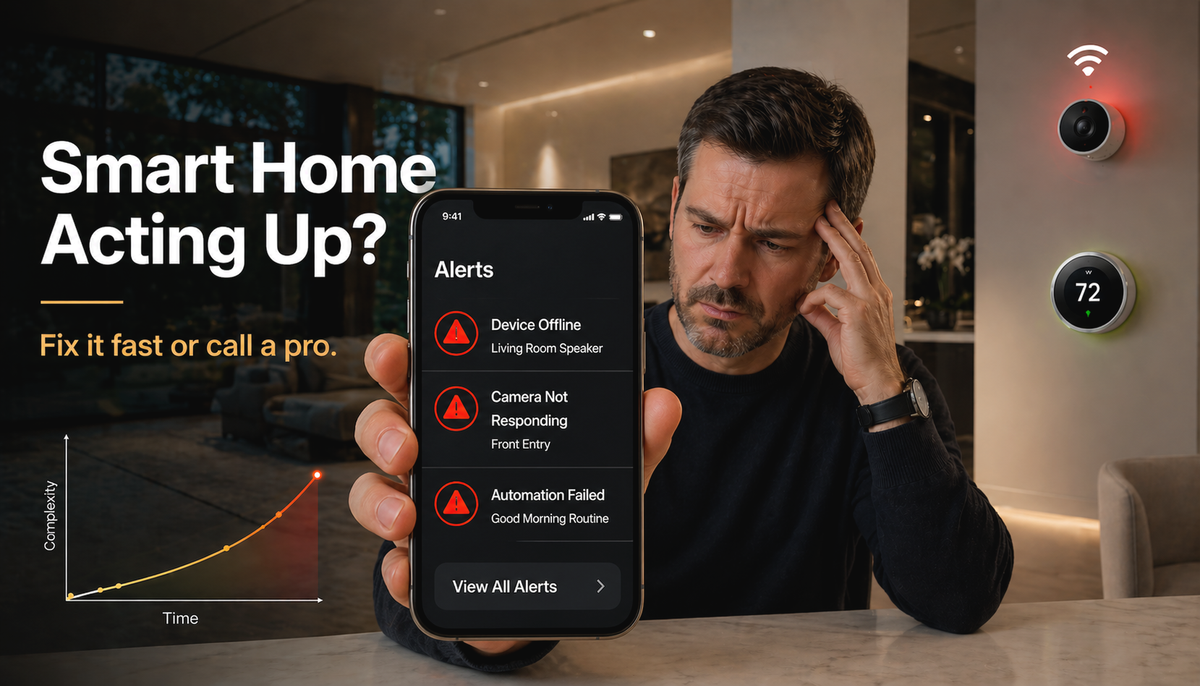
Your Control4 scene stopped running. Three devices show offline. You have restarted the router twice.
That frustration is common in Texas luxury estates where smart home systems run 50 to 150 connected devices across multiple platforms. More complexity means more points of failure.
SEIITS is a Texas luxury home technology concierge serving DFW, Austin, and Houston. This guide tells you exactly which failures you can fix yourself in minutes, and which ones need a professional before they become expensive. If you need smart home maintenance support right now, start at seiits.com.
Why Smart Home Devices Fail in 2026
Smart home devices are not stand-alone appliances. They depend on WiFi networks, mobile apps, firmware versions, cloud servers, and entire ecosystems that must cooperate simultaneously.
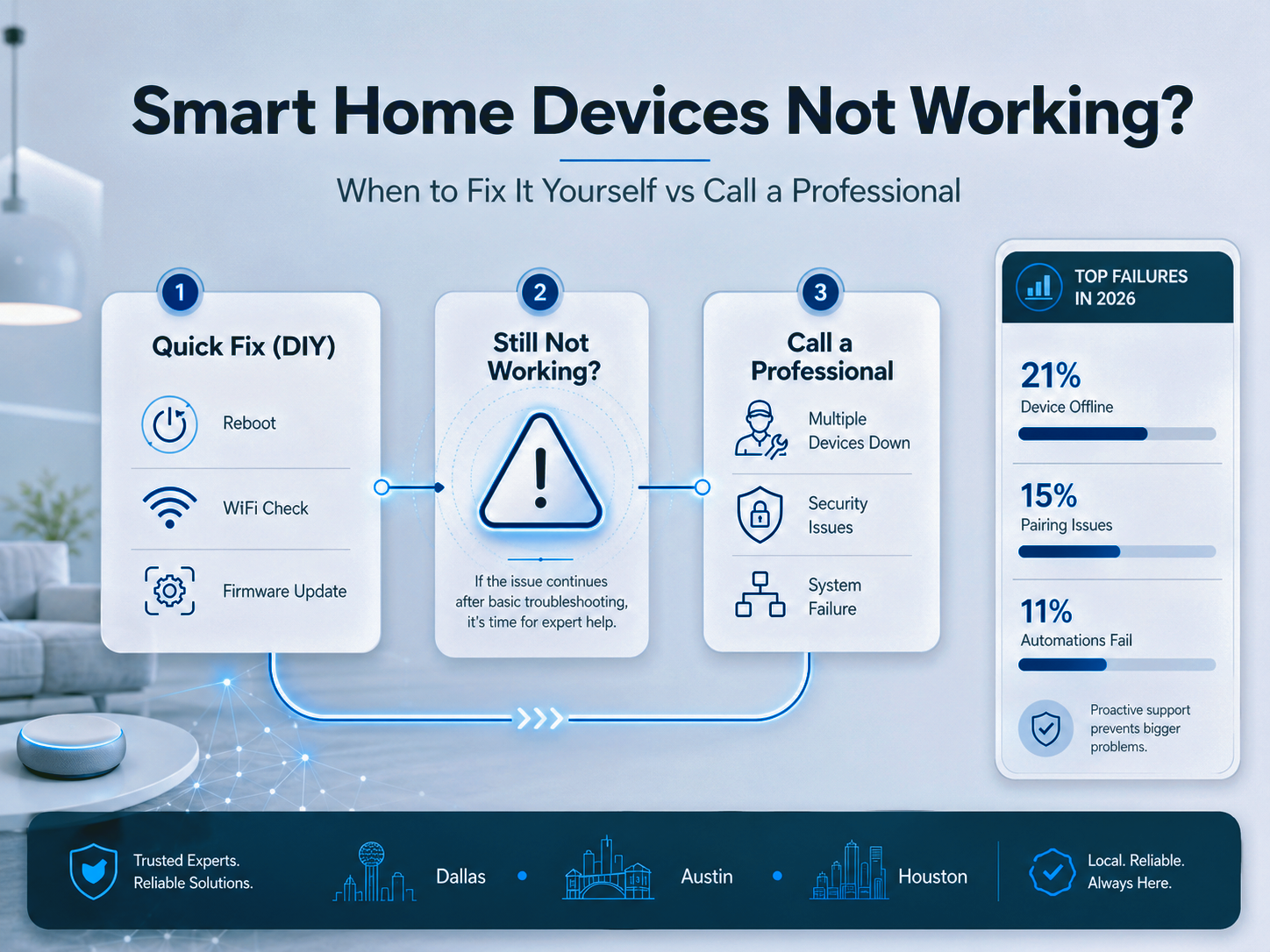
Analysis of 50,000 real-world smart home troubleshooting queries in 2026 reveals the top failure types: device offline or no response accounts for 21% of issues, pairing failures for 15%, and automations not running correctly for 11%.
For Texas luxury estates, the complexity is higher than average. A 9,000 sq ft Frisco home running Control4 with 120 connected devices, whole-home audio, 20 security cameras, and Lutron lighting control has far more interaction points than a standard consumer smart home setup.
Smart Home Problems You Can Fix Yourself
Most connectivity issues and simple software glitches resolve with straightforward troubleshooting. Start here before calling anyone.
Step 1: The Reboot Chain
Power-cycle in the correct sequence: restart the device first, then the hub, then the router. Many offline device errors clear entirely with a proper reboot chain in that order.
Avoid restarting everything simultaneously. Devices that power on before the router reaches full operation frequently fail to re-establish their connections.
Step 2: Check WiFi Band and Proximity
Most smart home devices use the 2.4 GHz WiFi band, not 5 GHz. If a device shows offline after a router upgrade or band change, verify it is connecting to the correct network. For estates with dead zones in far wings or above unconditioned spaces, see the the SEIITS WiFi guide on blogs.seiits.com.
Step 3: Update Firmware and Apps
Outdated firmware is a primary cause of device instability, automation failures, and security vulnerabilities. Check both the device firmware (through the manufacturer app) and the controlling app on your phone.
Set firmware updates to auto-apply where possible. Devices that fall multiple versions behind are significantly more likely to develop integration conflicts with other updated devices on the same network.
Step 4: Simple Physical Checks
Swap batteries in door sensors, motion detectors, and remote controls. Clean dust from sensors and camera lenses. Check that all cable connections are secure at the device and at the rack.
Many apparent smart home failures are physical, not digital. A loose Cat6A connection in the AV rack can drop an entire zone of devices offline and present as a software or automation problem.
When to Call a Smart Home Professional in Texas
Four situations require professional diagnosis. Attempting to resolve these without the right tools creates additional failures and can void equipment warranties.
1. Hardwired Devices and Electrical Components
Smart thermostats, hardwired security cameras, smart switches, and whole-home audio amplifiers involve low-voltage wiring that must be correctly terminated and grounded. The National Electrical Code (NEC) governs all residential wiring including low-voltage smart home installations. Any failure involving wiring, panel connections, or hardwired device installation requires a licensed technician. For Texas-specific thermostat guidance, see the SEIITS smart thermostat installation guide.
2. Multiple Devices Failing Simultaneously
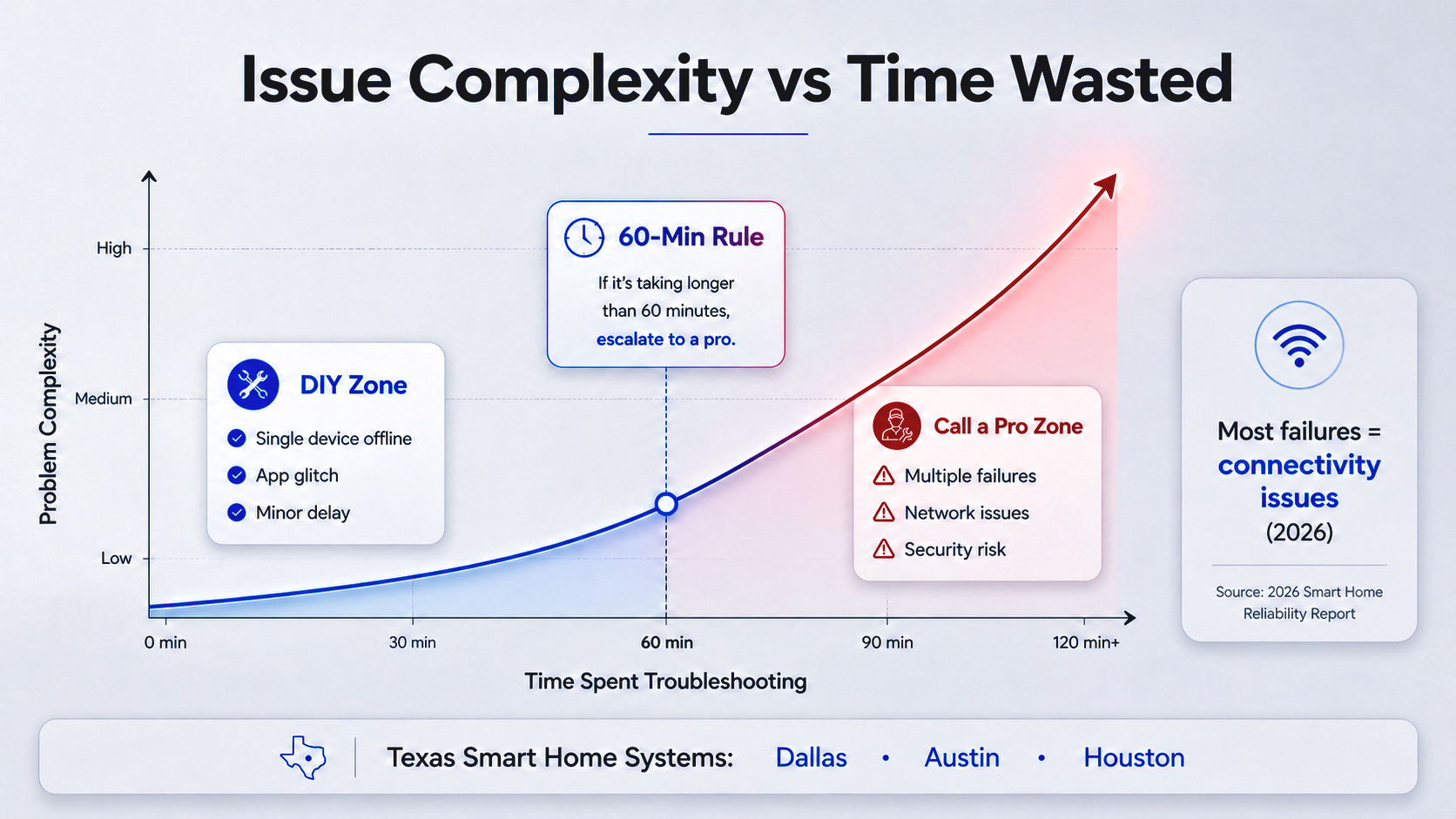
When three or more devices from different brands drop offline at the same time, the failure is almost always at the network infrastructure level, not the devices themselves.
This pattern indicates a VLAN configuration error, a PoE switch failure, a firmware conflict cascading across devices, or a routing problem that isolates device traffic. These require network diagnostic tools and knowledge of your estate's specific infrastructure to resolve correctly.
3. Security System Irregularities
Any unexpected behavior from your security system demands immediate professional attention. Cameras turning on without commands, motion alerts firing incorrectly, or access control devices responding at unexpected times all signal potential security breaches. The CISA IoT security guidelines recommend professional network audit for any suspected unauthorized access to IoT devices.
For Texas luxury estates, a security breach is not just a technology problem. It is a physical safety risk. Call a professional the same day.
4. Platform Programming Issues
Control4, Crestron, and Savant automation programming requires dealer-certified technicians. If your scenes stop working after a platform update, if a device driver breaks, or if your system fails after a firmware push, you need a programmer with dealer access to the platform. SEIITS handles smart home technology systems including Control4 and Savant programming across DFW, Austin, and Houston estates.
DIY vs Professional: The Honest Comparison
This comparison reflects real-world outcomes, not marketing claims.
The Hidden Risk: Smart Home Security in Texas Estates
An unsecured smart home is not just a technology inconvenience. It is a data and physical security risk. The CISA published IoT security best practices identify factory-default passwords, unpatched firmware, and unsegmented IoT networks as the three most common vulnerabilities in residential smart home systems.
Texas luxury estates running 50 to 150 connected devices across cameras, locks, and smart home platforms have a significantly larger attack surface than average consumer setups.
Three Security Steps Every Texas Estate Owner Should Take Now
- Change all default passwords on every device, hub, and router. Factory passwords are documented publicly and are the first thing an attacker tests.
Segment your network with VLANs. IoT devices, security cameras, personal computers, and smart home automation platforms should each be on separate network segments. Contact SEIITS for a full network segmentation setup as part of the home security service at seiits.com/homesecurity.
- Enable automatic firmware updates on every device. Devices running outdated firmware are the most common entry point for network intrusions.
SEIITS handles full network security audits for Texas luxury estates as part of the home security service. This includes VLAN segmentation, firmware update scheduling, and ongoing monitoring through managed membership tiers.
Texas-Specific Smart Home Failure Patterns
Texas luxury estate construction creates failure patterns that generic smart home guides do not address.
WiFi Dead Zones in Stone and Brick Estates
Brick veneer and limestone construction in DFW and Austin reduces 5 GHz WiFi signal by 50-80% per wall. Texas radiant barrier roof sheathing adds additional attenuation at ceiling planes. Many 'device offline' failures in Texas luxury homes are WiFi coverage problems, not device failures. See the full diagnosis in the SEIITS home networking service.
Texas Heat and Equipment Reliability
Routers, hubs, and AV amplifiers placed in unconditioned garages or utility closets in Texas summer heat exceed their operating temperature limits. Most networking equipment has a maximum operating temperature of 104 degrees Fahrenheit. Texas garages reach 120 degrees or higher in July.
If your smart home system works in winter but develops failures every summer, the cause is thermal throttling and power cycling on overheated hardware. The solution is moving equipment to conditioned, ventilated space.
Control4 and Crestron Post-Update Failures
Control4 and Crestron platform updates occasionally break device drivers, especially when manufacturers push firmware updates to individual devices that change the communication protocol. This creates a specific failure pattern: the device was working, a background update ran, and now the scene or automation fails.
This failure requires a certified programmer to restore. SEIITS provides SEIITS home electronics maintenance plans that include quarterly firmware management to prevent exactly this situation.
How to Prevent Smart Home Failures in Texas
A simple maintenance routine prevents the majority of smart home failures before they happen.
SEIITS includes all six maintenance tasks in the Elite and Prestige membership tiers, with quarterly visits, 24/7 remote monitoring, and same-day response for security system failures.
For homeowners still researching whether professional smart home support is right for them, see the SEIITS home automation guide for Dallas, Austin, and Houston for a full overview of services and estate technology management options.
Where SEIITS Provides Smart Home Repair and Maintenance in Texas
- Dallas: Highland Park, University Park, Preston Hollow, Bluffview, Lakewood
- North Dallas: Frisco (Phillips Creek Ranch, Starwood), Plano (Willow Bend), McKinney, Allen, Prosper
- DFW Luxury Enclaves: Southlake (Carillon, Vaquero), Westlake, Colleyville, Trophy Club
- Austin Metro: West Lake Hills, Rollingwood, Barton Creek, Bee Cave, Lakeway
- Houston Metro: River Oaks, Memorial, Tanglewood, The Woodlands, Sugar Land
- San Antonio: Alamo Heights, Dominion, Stone Oak
Frequently Asked Questions
Why are my smart home devices not working?
Analysis of 50,000 smart home troubleshooting queries in 2026 shows device offline or no response accounts for 21% of failures. This is almost always a network connectivity issue: the device lost its WiFi connection, the IP address changed, or the hub restarted without the device reconnecting. Start with a reboot chain (device first, then hub, then router) and verify the device is on the correct WiFi band. If multiple devices fail simultaneously, the cause is infrastructure-level and requires professional diagnosis.
When should I call a professional for smart home repair?
Call a professional immediately if: hardwired devices fail (electrical risk); multiple devices drop offline simultaneously (infrastructure failure); your security system behaves unexpectedly (potential breach); or you have spent more than 60 minutes troubleshooting without progress. For Texas luxury estates running Control4, Crestron, or Savant, any failure after a platform update requires a dealer-certified programmer, not DIY troubleshooting.
Can smart home problems be a security risk?
Yes. Security cameras turning on unexpectedly, smart locks responding without commands, or devices triggering at unusual times can all indicate unauthorized access. The CISA recommends immediately isolating any device showing signs of unauthorized control and performing a professional network security audit. Do not wait. Contact a professional the same day you notice unexpected security device behavior.
Why does my smart home work in winter but fail every summer in Texas?
This is a Texas-specific thermal failure. Consumer routers, mesh nodes, and AV amplifiers placed in garages, unconditioned closets, or near attic access points exceed their maximum operating temperature of 104 degrees Fahrenheit during Texas summer heat. The device thermal-throttles and reboots, causing intermittent failures that disappear when ambient temperatures drop. The fix is moving all networking equipment to a conditioned, ventilated space.
How much does professional smart home repair cost in Texas?
Professional smart home service call pricing varies by estate size, system complexity, and platform. SEIITS offers flat-rate service calls at seiits.com/servicecallscheckout. For estates needing ongoing maintenance rather than one-time repairs, the SEIITS Elite and Prestige membership tiers provide quarterly visits, 24/7 monitoring, and same-day priority response.
What is the difference between a smart home reset and a factory reset?
A reset (soft reset or reboot) cycles the device's power without erasing settings - this is always the first step in troubleshooting and resolves most temporary offline states. A factory reset erases all device settings, removes it from your smart home platform, and returns it to out-of-box condition. Factory reset should only be performed when soft reset and firmware update fail to resolve the issue. Always back up your Control4 or Crestron programming configuration before factory resetting any hub or controller.
Book a free assessment at
Comments ()