
Installing a Smart Thermostat in Texas: what you must know before getting started
Step-by-step guide on installing smart thermostat in Texas. Real 2026 costs, C-wire walkthrough, Nest vs Ecobee, and when to call a professional in Dallas, Austin or Houston.
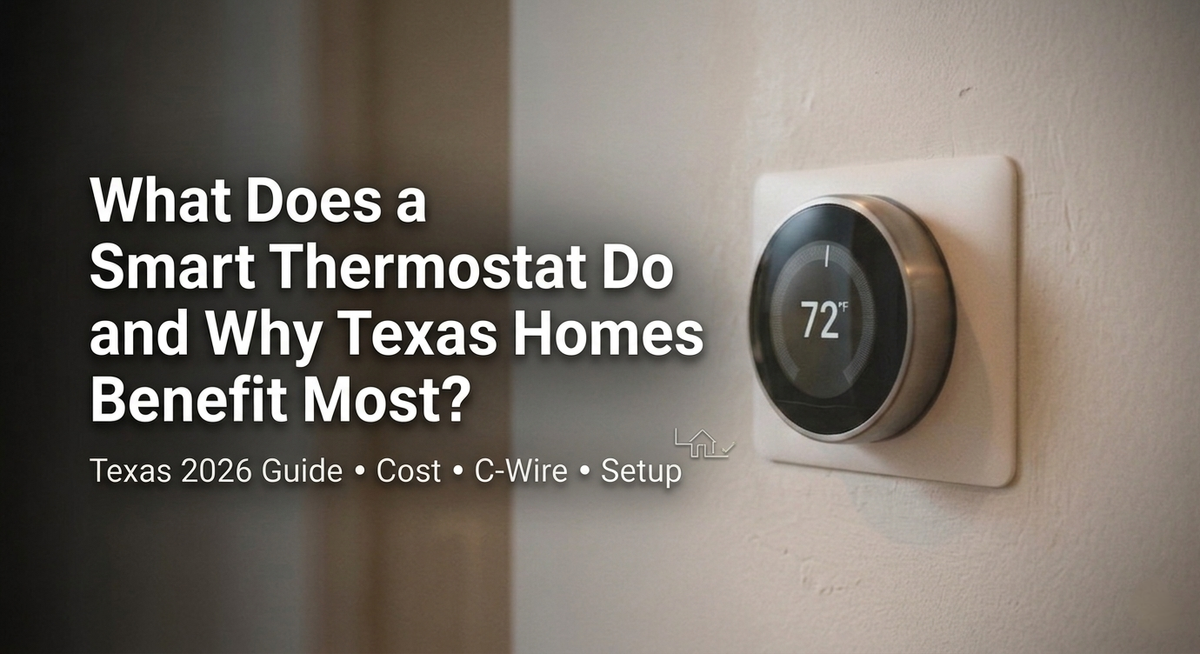
Last January in Dallas, my neighbour's heating bill hit $340 for a 2,100 sq ft home. Mine was $194. Same street, same build year, same square footage. The difference was a $249 Ecobee I had installed six months earlier. It paid for itself before the second summer arrived.
That story is why I wrote this guide. Most homeowners who call us after a bad thermostat experience did not make a bad decision – they made a decision without the right information. Wrong device for their HVAC type, no C-wire in the wall, or an installer who handed them a remote and left. This guide covers how to install a smart thermostat in Texas correctly: C-wire check, right device for your HVAC type, and a configured schedule before anyone leaves.
Across more than 300 thermostat installations I have led across DFW, Houston, and Austin, two mistakes account for most of the callbacks: buying a device before checking for a C-wire, and choosing a standard thermostat for a heat pump system. Both are avoidable with five minutes of prep. I will walk you through both.
What Does a Smart Thermostat Do – and Why Texas Homes Benefit Most?
A smart thermostat learns your schedule, connects to your HVAC system, and adjusts temperature automatically. In Texas, where the average residential electricity bill hit $163.72 per month in 2024 – second-highest in the country – that matters more than in most US states. ACEEE's review of six independent studies puts HVAC savings at 8-15%. On a Texas bill, that is $160-$295 a year from one device.
EIA data confirms the average Texas residential electricity bill was $163.72 per month in 2024, at 14.94 cents per kWh. That's the annual average. Summer months in Dallas or Houston push well past $300. When your AC is running 8-10 hours a day in July, a thermostat that learns when you leave and adjusts accordingly is not a luxury – it is the lowest-cost energy upgrade available. ACEEE's peer-reviewed analysis of six independent studies puts the savings range at 8-15% of total HVAC costs. At Texas rates, that is $160-$295 per year from a device that typically costs $130-$270.
The payback math works because of how Texas HVAC usage is structured. Your system runs harder, longer, and across more months than most US homes. Energy savings: 10-23% on cooling. Remote control that lets you cool the house before you walk in – useful when an uncooled Dallas home in July hits 90 degrees inside within an hour. Geofencing that adjusts automatically when you leave, without you remembering to touch anything. And for older homes with hot bedrooms and cold living rooms, Ecobee's room sensors fix a problem that a new HVAC unit often cannot.
How to Install a Smart Thermostat: Step-by-Step
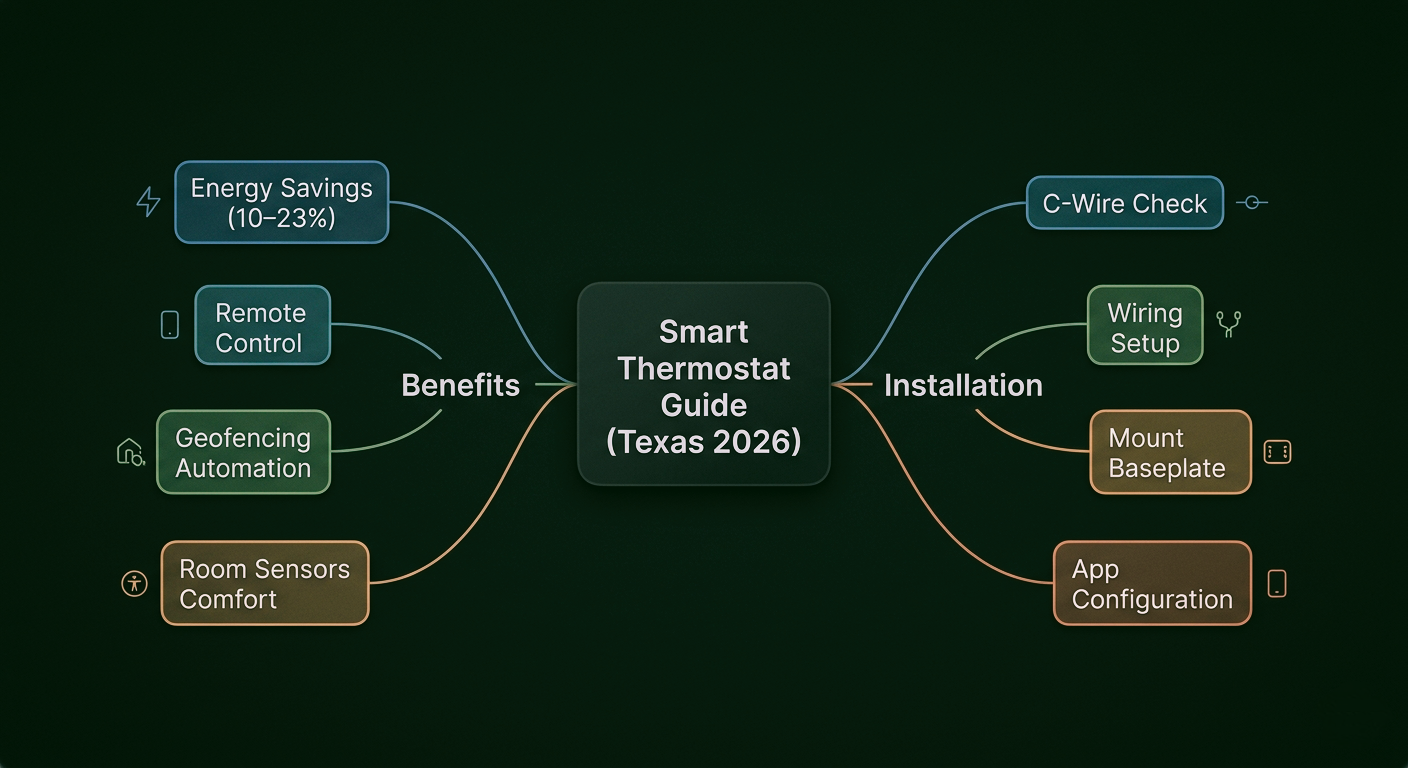
Turn off HVAC power at the breaker first. Then remove the old unit, photograph every wire before touching anything, label each wire with its terminal letter, mount the new baseplate level, connect wires to matching terminals, restore power, and complete the app setup. The whole job takes 30-60 minutes for a standard single-zone home. Do the C-wire check before you buy the device – not after.
Step 1: Check for a C-Wire Before You Buy Anything
This is the step most homeowners skip. They buy the thermostat, open it, pull off the old faceplate, and then find an empty terminal at C. Now they either need a $30 adapter or a $150-$350 professional wiring run – and they already bought the device. The C-wire is the primary compatibility checkpoint for any smart thermostat installation. It provides the continuous 24V power the Wi-Fi radio and touchscreen need. Sensi by Copeland's technical documentation confirms that homes built within the last 40 years generally have a C-wire – but pre-2000 builds across Dallas, Houston, and Austin frequently do not.
Check before you order anything: pull off your current thermostat cover and look for a wire at the terminal labelled C. If it's empty, you have two real options. The Ecobee SmartThermostat Premium includes an add-a-wire adapter in the box – that solves it without any additional cost. Or have a professional run a dedicated C-wire, which runs $150-$350 depending on wall access. Thermostats that try to 'power steal' without a C-wire cause HVAC interference under heavy summer load. That interference shows up in July, when your system is already working hardest. Do not skip this step.
Step 2: Turn Off Power at the Breaker
Switch off the HVAC circuit at your breaker box before touching any wiring. Never work on a live circuit. Confirm power is off by checking the thermostat display – it should be completely dark.
Step 3: Photograph and Label Every Wire
Unscrew the old thermostat faceplate and photograph every wire and its terminal letter before disconnecting anything. This photograph is your complete reference. Use the sticker labels in your new thermostat box – label each wire R, G, Y, W, C before removing it from the old unit.
Step 4: Mount the New Baseplate
Attach the baseplate to the wall with the provided screws. Level it – this matters more than it sounds. A thermostat mounted crooked reads air from the wrong plane of the room and gives your HVAC a skewed temperature signal. A 30-second check with a spirit level prevents that.
Step 5: Connect Wires and Power On
Insert each labelled wire into its matching terminal. Push until you feel a click. Before you close the faceplate, go back and check every terminal against your photograph – one wire in the wrong slot and your system either won't respond or will run backwards. Attach the thermostat to the baseplate, restore power at the breaker, and let the setup wizard walk you through the rest.
Step 6: Set the Schedule and Turn On Geofencing
Download the manufacturer app, connect to Wi-Fi, and set a weekly temperature schedule. Then enable geofencing. Most people skip this. Geofencing uses your phone's location to cool the house before you arrive and ease off when you leave -- without you touching anything. That one setting saves $30-$80 per year on its own.
From the field: If any wire is unlabelled, corroded, or your system has more than 5 wires, stop here. This is not overcaution, I have seen a misidentified wire take out a control board that cost $400 to replace. A professional call costs less and comes with documentation. Seiits serves same-day in DFW and Houston.
How Much Does It Cost to Install a Smart Thermostat in Texas?
Professional smart thermostat installation in Texas costs $210-$450 total, including the device and labour. DIY installation costs $130-$270 (device only). Homes without a C-wire add $150-$350 for professional wiring, or $30 for an add-a-wire adapter. At Texas energy rates, a $249 Ecobee installed for $150 labour recovers its total cost in 14-24 months through energy savings alone.
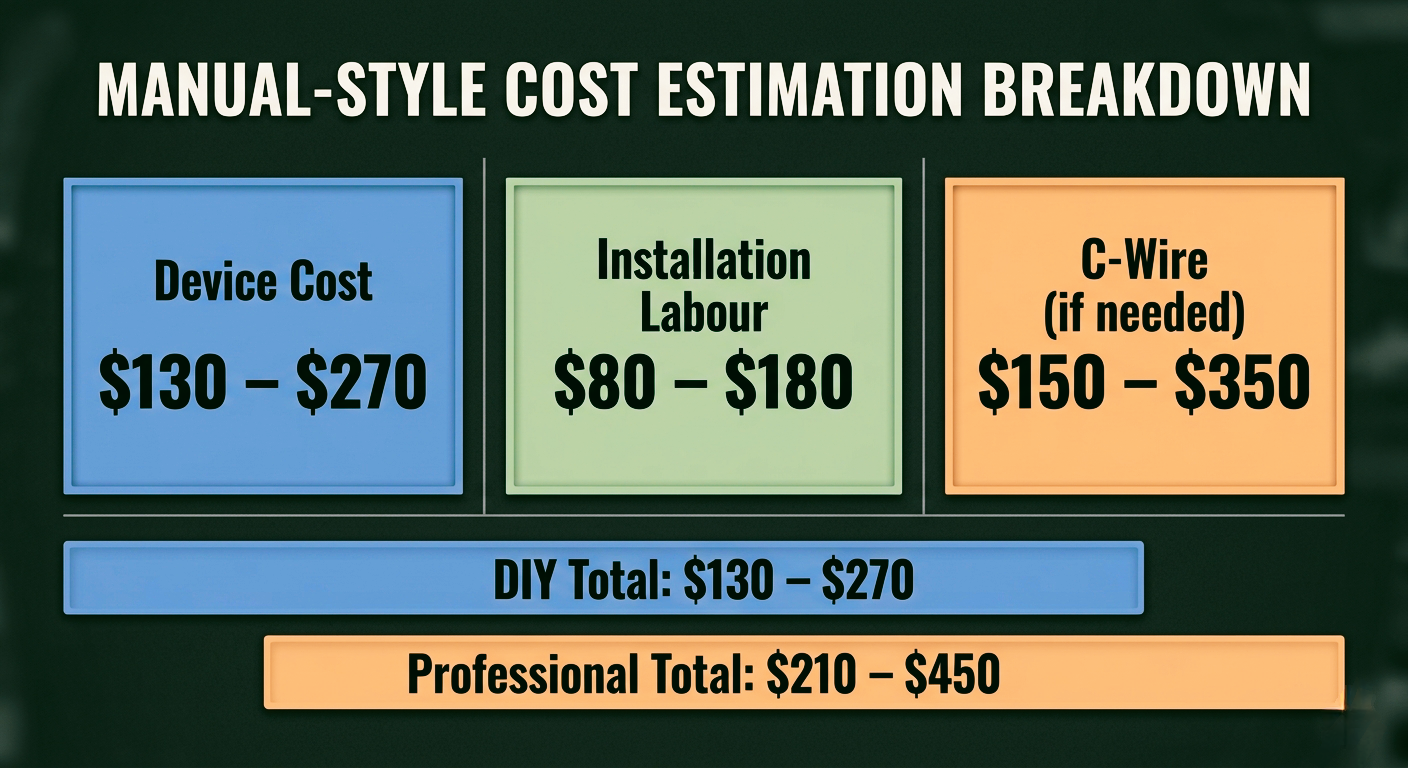
Payback period at Texas energy rates: a $249 Ecobee professionally installed for $150 (total $399) saves $160-$295 per year based on ACEEE's peer-reviewed 8-15% savings range applied to Texas's $163.72 monthly average bill. Full payback in 16-28 months. After that it runs at a net saving every year.
To put that in perspective: EIA data shows Texas residential customers paid $163.72 per month on average in 2024. A 10% reduction from a single correctly programmed thermostat is $196 per year. Your HVAC contractor cannot get you $196 a year for under $250 installed. Nothing else on this list does either.
Which Smart Thermostat Works Best in Texas?
For most Texas homes, buy the Ecobee SmartThermostat Premium. It includes the C-wire adapter, natively supports heat pumps, and handles multi-zone temperature with room sensors – the three most common problem points in Texas installs. The Nest Learning Thermostat is the right call for a standard single-zone home where you already have a C-wire and want the auto-learning to handle the schedule for you. The Honeywell T9 works if budget is the constraint.
Texas AC runs 8-12 hours a day across a 3-4 month stretch. Not every thermostat is designed for that duty cycle. If you are still deciding which device to buy before you figure out how to install a smart thermostat yourself, the table below is what I actually recommend to clients based on their HVAC setup, not what looks best on a spec sheet.
Smart Thermostat for Heat Pump Systems
If your home has a heat pump, this is the most important section in the article. Heat pump wiring uses an O/B terminal that controls the reversing valve -- the component that switches the system between heating and cooling mode. Honeywell Home's wiring documentation confirms that incorrect O/B configuration causes the system to heat when it should cool, or locks it out of auxiliary heat entirely. I have seen both. The fix costs $300-$600 in control board repairs. The Ecobee SmartThermostat Premium is the right choice for heat pump homes – it identifies heat pump systems automatically during setup, which removes most of the risk for a careful DIYer. If you are not certain your system is a heat pump, look at your outdoor unit. A heat pump has refrigerant lines running to it year-round. A standard AC unit does not run in winter.
Smart Thermostat for Baseboard Heaters
Older homes in Dallas and Houston sometimes have electric baseboard heaters rather than central HVAC. If yours does, stop reading the standard installation guide. Baseboard heaters run on 120V or 240V line voltage. Every smart thermostat in this article – Nest, Ecobee, Honeywell T9 – is designed for 24V low-voltage systems. Connecting a 24V thermostat to a 240V baseboard circuit will destroy the device and potentially damage the circuit. You need a line voltage smart thermostat specifically rated for baseboard use, or a professional assessment of whether upgrading to central HVAC is the better long-term call for your home.
Texas City Guide: What Dallas, Austin and Houston Homeowners Should Know
Dallas-Fort Worth
The DFW market is where smart thermostat ROI is easiest to sell to homeowners because the math is undeniable. Three to four months above 100 degrees, cooling bills running $250-$350 in peak months, and a base of newer homes in Frisco, Plano, and Southlake that were pre-wired with C-wires from 2015 onward. For those homes, a professional install is a one-hour job. For pre-2000 homes in Irving, Garland, and older parts of Plano – where the C-wire question comes up on nearly every job – budget $150-$350 for wiring before you factor in the device.
One pattern I see consistently in DFW intake assessments: homeowners in Frisco and Prosper with newer builds that have heat pumps. They assume a C-wire is present – usually correct – but miss the heat pump compatibility question entirely. If your home was built after 2018 in those markets, check the outdoor unit before ordering your thermostat. Our guide on when to hire a smart home integrator covers the specific scenarios where a $150 professional assessment prevents a $600 repair.
Austin
Austin Energy's four-tier residential rate structure is the detail that separates a standard smart thermostat installation from a well-optimised one. Standard savings are 8-15%. But Austin homeowners who configure pre-cooling before the 3pm-8pm peak window see an additional 10-15% reduction on top of that, because Austin Energy's upper tiers cost significantly more per kWh. The Ecobee handles time-of-use rate scheduling automatically once you input your tier structure. Most installers do not set this up. Seiits does.
Houston
Houston adds a variable that Dallas and Austin do not: sustained humidity. A 90-degree day in River Oaks at 85% humidity loads your HVAC differently than a 100-degree day in Plano at 20% humidity. Ecobee and Nest both monitor and display indoor humidity, which tells you whether the system is actually keeping up or just running constantly without achieving the set temperature. Both symptoms point to different problems – the thermostat data lets you diagnose before you call an HVAC contractor.
The other Houston-specific issue is multi-zone systems. River Oaks, Memorial, and The Woodlands homes above 3,500 sq ft frequently have two to four HVAC zones with separate air handlers. A thermostat swap in those homes is not a DIY project – it involves zone controller compatibility, wiring documentation for each handler, and usually a day of work. If that is your situation, start with our guide to smart home integration planning for Texas new construction and retrofits before purchasing any devices.
DIY vs Professional Installation: Which Is Right for Your Texas Home?
If your home has a standard single-zone system, clear wire labels, and a confirmed C-wire, DIY is fine and the job takes under an hour. If you have a heat pump, multiple zones, baseboard heating, more than 5 wires, or you want the thermostat connected to a broader smart home system – call a professional. The repair cost when something goes wrong on a heat pump system ($300-$600) almost always exceeds what professional installation would have cost.
Most standard single-zone Texas homes are genuine DIY candidates. Nest and Ecobee both ship with clear instructions and 7-terminal labelling stickers. If your wiring is clean, your C-wire is confirmed, and your system is not a heat pump, you can do this in under an hour.
The situations where we recommend calling us instead:
- Heat pump systems: the O/B terminal configuration is specific to your unit's manufacturer. One wrong setting and the system runs in the wrong mode. Repair costs $400-$800.
- Multi-zone HVAC: homes over 3,000 sq ft in Houston and DFW frequently have 2-4 zones with separate air handlers. Each needs its own thermostat and the zone controller needs to be assessed for compatibility.
- No C-wire and no adapter: we run a new C-wire cleanly through finished walls. No patching, no drywall work, no mess.
- Integration with Crestron, Control4, or Savant: thermostat programming within a whole-home automation platform is not a DIY task regardless of HVAC type.
The difference between Seiits and a one-time installer is what happens after the job. We document your wiring, program your scenes, and pick up the phone when the app update in February changes something. That is not standard. Most installers are gone before the ink on the receipt dries.
"I tried installing the Nest myself and kept getting error codes. Seiits came the next morning, found a wiring issue with my heat pump setup in under 20 minutes, and had everything running perfectly. Should have called them first." – Homeowner in Plano, TX
Frequently Asked Questions: Smart Thermostat Installation in Texas
These are the questions that come up most often in Seiits intake assessments across DFW, Houston, and Austin. If your specific situation is not covered here, book a free assessment at seiits.com/assessment – we confirm your HVAC type, C-wire status, and compatibility before recommending anything.
How much does it cost to install a smart thermostat in Texas?
Professional smart thermostat installation in Texas costs $210-$450 total, including device and labour. DIY is $130-$270 (device only). Homes built before 2000 in Dallas, Austin, or Houston typically lack a C-wire, adding $150-$350 for wiring. At Texas summer cooling rates of $200-$400 per month, a $249 Ecobee installed professionally for $150 labour pays for itself in 14-24 months. Seiits provides installation across Dallas, Austin, Houston, and San Antonio with same-day availability in DFW.
How do I install a smart thermostat if my home has no C-wire?
Two options. First: choose a thermostat with a built-in add-a-wire adapter – the Ecobee SmartThermostat Premium includes one and installs without a dedicated C-wire. The adapter costs roughly $30 if purchased separately. Second: have a professional run a new C-wire through your walls, which costs $150-$350 in Dallas, Austin, or Houston. Avoid power-stealing thermostats in Texas. Under heavy summer load – 8-12 hours of AC daily – they create interference with your HVAC control board and cause unreliable operation.
Will a smart thermostat work with my older HVAC system in Texas?
Most smart thermostats work with standard 24V HVAC systems, which cover the vast majority of Texas homes. Two exceptions matter. Electric baseboard heaters use 120V or 240V line voltage – they require a line voltage model costing $80-$150, not a standard 24V thermostat. Heat pump systems need a device with dedicated heat pump support. Both Ecobee and Nest handle heat pumps reliably. Use the Honeywell Home compatibility checker at honeywellhome.com before purchasing – incorrect wiring on a heat pump costs $300-$600 to repair.
How much money can a smart thermostat save on Texas energy bills per year?
EIA data shows Texas residential customers averaged $163.72 per month in electricity costs in 2024 at 14.94 cents per kWh – the second-highest average monthly bill in the US. ACEEE's review of six independent studies confirms smart thermostats reduce HVAC energy use by 8-15%, translating to $160-$295 per year savings at the Texas average. A Dallas homeowner in a 2,500 sq ft home with a correctly programmed Ecobee can realistically save $200-$280 annually, recovering total device and installation cost within 18-24 months.
Can I install a smart thermostat myself in Texas?
Yes, for a standard single-zone system with clear wire labelling and a functioning C-wire. The installation takes 30-60 minutes and both Nest and Ecobee include clear printed instructions. Stop and call a professional if your system has a heat pump, multiple zones, baseboard heating, more than 5 wires, or any unlabelled or corroded wiring. A control board damaged by an incorrect heat pump wiring connection costs $300-$600 to repair – typically two to three times the cost of professional installation in Dallas or Houston.
Is Nest or Ecobee better for a Texas home?
For most Texas homes, the Ecobee SmartThermostat Premium is the better choice because it includes a C-wire adapter – essential for pre-2000 homes in Dallas, Houston, and Austin – and has native heat pump support. The Nest Learning Thermostat is better for standard single-zone homes where auto-learning is the priority and a C-wire is already present. Both reduce HVAC energy use by 8-15% per ACEEE's peer-reviewed research. Honeywell Home's wiring documentation is the authoritative resource for heat pump terminal compatibility checks before purchasing.
How long does professional smart thermostat installation take in Dallas or Houston?
A standard single-zone smart thermostat installation takes 45-90 minutes including assessment, wiring, setup, and walkthrough. Multi-zone homes with 2-4 thermostats typically take 2-3 hours. Homes requiring a C-wire run through finished walls add 30-60 minutes. Seiits offers same-day service in DFW and Houston for single-zone installations. In Plano, Frisco, and Southlake, homes built after 2015 almost always have C-wires in place, which keeps installation time at the lower end. River Oaks and Memorial homes in Houston frequently have multi-zone systems requiring the longer appointment window.
Ready to Install? Here Is How to Start.
If you have confirmed your C-wire, identified your HVAC type, and your system is a standard single-zone setup, you can do this yourself today. Buy the Ecobee if you are uncertain about the C-wire. Buy the Nest if you have confirmed C-wire and a standard single-zone system.
If you have a heat pump, a multi-zone system, or you want your thermostat connected to a Crestron, Control4, or Savant platform -- contact Seiits. We cover Dallas, Austin, Houston, and San Antonio. We document the installation, program your schedule, and we are available when something changes six months from now. That last part is the one most installers skip.
Book a free on-site assessment: seiits.com/assessment. We confirm your HVAC type and C-wire status, recommend the right device for your specific setup, and give you a clear itemised quote. No pressure, no obligation. Same-day availability in DFW and Houston.


Comments ()