Private Home Cloud and NAS Storage in Texas: What High-Net-Worth Homeowners Actually Need in 2026
our files, your surveillance footage, your estate records - all sitting in someone else's data centre. Here is what a professionally managed private home cloud looks like in Texas.
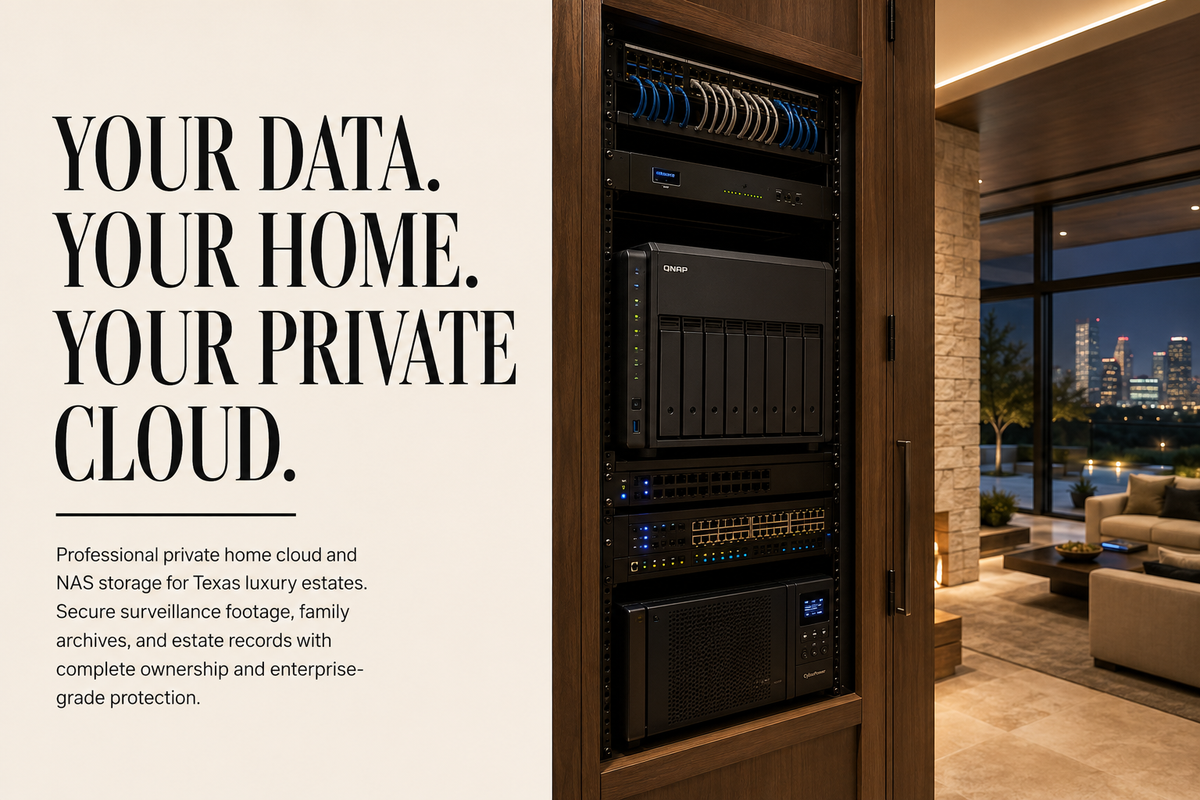
A client in Highland Park called us after her cloud storage provider sent a notice that her account had been flagged for "unusual activity." She had 11 years of family photos, 14TB of security camera footage from two properties, and a full estate document archive sitting in a service she no longer trusted. Her question was simple: how do I get all of this off someone else's server and onto something I actually own?
That question is why I wrote this guide. The private home cloud setup conversation is one I have been having with Texas homeowners in Southlake, River Oaks, and Barton Creek for the past several years - and it is accelerating. iCloud, Dropbox, and Google Drive are fine for casual users. They are not the right answer for an estate that generates 2TB of camera footage per month, stores financial documents, and has family media that cannot be replaced.
Across more than 80 home data system builds I have led across DFW, Houston, and Austin, the same pattern appears: homeowners arrive with data spread across four or five different cloud services, no coherent backup strategy, and no clear idea who actually has access to their files. A professionally designed private home cloud fixes all three - in one installation, with one managed system, under your roof and under your control.
Why Public Cloud Is the Wrong Answer for Texas Estate Owners
Google, Dropbox, and iCloud are designed for average consumer data volumes and average consumer privacy requirements. A Texas estate generating 2TB of surveillance footage per month, managing financial documents across multiple properties, and storing 30+ years of irreplaceable family media has neither average volumes nor average stakes. Public cloud means your data lives on someone else's server, under their terms of service, accessible to their employees, and subject to their pricing decisions - permanently.
The consumer NAS market reached $31.8 billion in 2024 and is growing at 13.1% annually, per Consegic Business Intelligence market data. The primary driver is not storage capacity - it is data sovereignty. High-net-worth homeowners have specific reasons public cloud fails them that average consumers do not share.
The pricing problem is the first one most clients notice. Google One charges $9.99/month for 2TB. A Texas estate with 20 cameras recording at 4K generates roughly that per week. At current cloud pricing, storing 12 months of footage from a standard Southlake or River Oaks security setup costs $4,800-$12,000 per year - for data you do not own and cannot fully control. A professionally installed QNAP NAS storage system with 40TB of redundant capacity costs $3,000-$8,000 once, handles the same data load, and runs indefinitely on your network.
The privacy problem is the one that concerns me more. Research from Westco Security confirms that 62% of IoT (Internet of Things) devices collect personally identifiable information and 57% transmit behavioural data to the cloud - including when you are home and away, your household routines, and movement patterns that create a detailed profile of your estate. For a high-net-worth family in Highland Park or Westlake, that is not a minor inconvenience. It is a security exposure.
The ransomware problem is the one most homeowners do not anticipate. Kaspersky's threat research confirms that home NAS devices from QNAP, Synology, and Asustor have all been primary ransomware targets over the past five years. A consumer who buys a NAS, plugs it in, enables remote access with default settings, and never updates the firmware has not built a private cloud - they have built an exposed network drive. A professionally hardened and managed private home cloud is a different thing entirely.
What Does a Private Home Cloud Actually Include?
Quick answer: A private home cloud is not just a NAS device on a shelf. It is a NAS with the right drives for the workload, configured with proper RAID for redundancy, hardened against external access, integrated into your home network, connected to an offsite backup, documented, and monitored. The device is 30% of the job. The configuration, hardening, and ongoing management are the other 70% - and that is where most DIY setups fail.
Here is what a complete private home cloud installation from Seiits actually includes:
- NAS device selection and sizing: matching the right Synology or QNAP model to your specific workload - camera footage volume, media library size, number of simultaneous users, and integration requirements with your existing smart home system.
- Drive configuration: professional RAID (Redundant Array of Independent Disks) setup (RAID 1, RAID 5, or RAID 6 depending on capacity and redundancy requirements) using NAS-rated drives from Seagate IronWolf or Western Digital Red. Consumer drives fail in NAS workloads within 12-18 months. We do not install them.
Network hardening: disabling vendor cloud relay services (QuickConnect for QNAP, Synology's relay servers), configuring VPN access for remote connectivity, setting up firewall rules, and enabling hardware-level AES-256 encryption for data at rest.
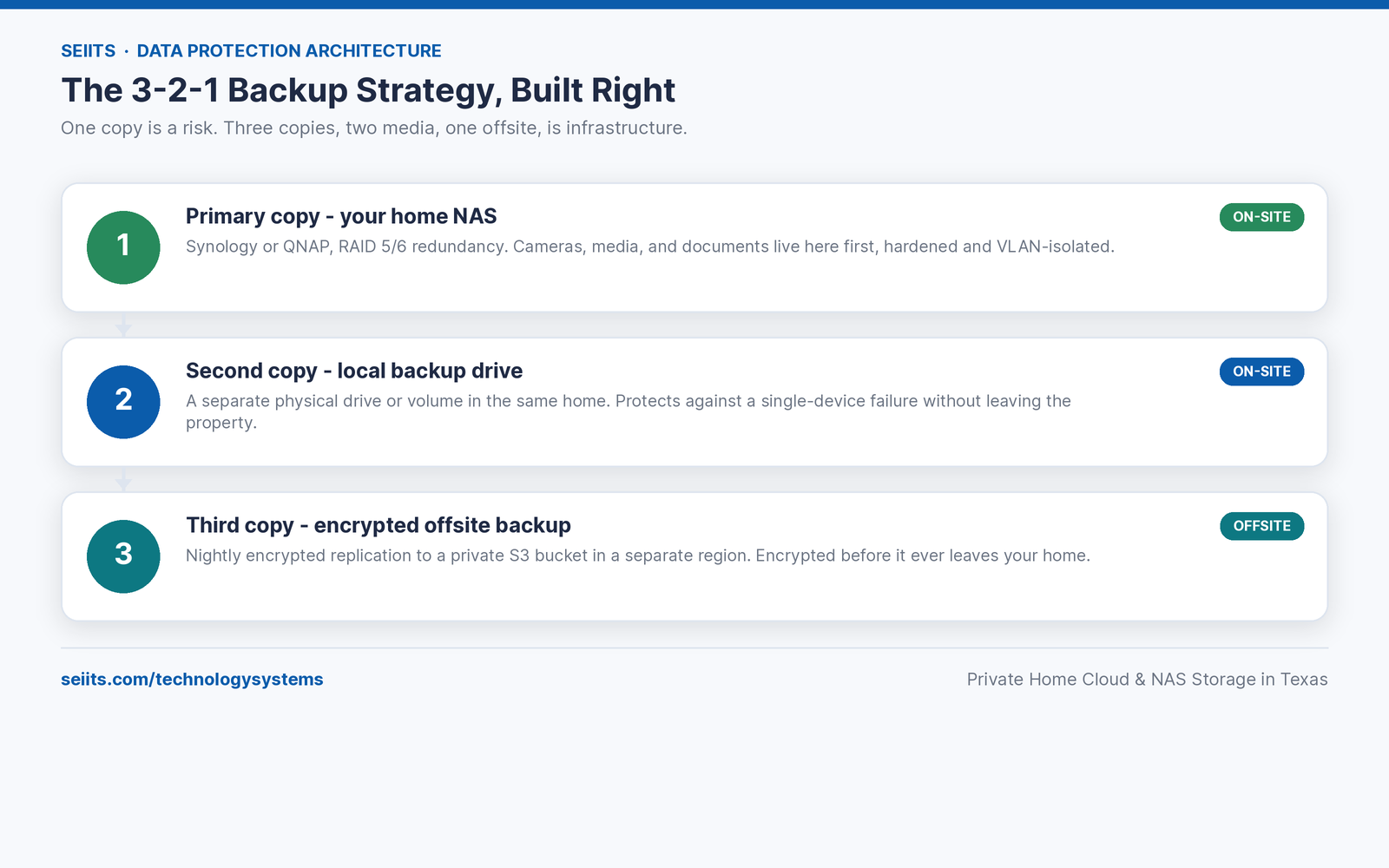
- Offsite backup configuration: 3-2-1 backup strategy - local RAID redundancy, a second local backup to an external drive, and an encrypted offsite backup to a private S3 bucket or colocation facility. One copy onsite is not a backup strategy.
Integration with your home security system: configuring camera footage to write directly to the NAS rather than cloud servers, connecting to your Crestron, Control4, or Savant automation system, and setting retention policies by camera zone.
- Documentation handoff: labelled network diagram, storage pool configuration, user access controls, and a written runbook for your estate manager or household staff.
- Managed maintenance: firmware updates on a schedule we control, drive health monitoring with SMART (Self-Monitoring, Analysis, and Reporting Technology) alerts, storage capacity reporting, and immediate response when a drive flags an issue - before it fails.
From the field: I have responded to three calls in the past 18 months from homeowners whose consumer-installed NAS systems were encrypted by ransomware. In every case, the device had been connected to the internet with default credentials and no firmware updates since installation. The data was irretrievable. A managed system with proper hardening and monitored access would have prevented all three.
Synology vs QNAP NAS Storage: Which Platform Is Right for Your Texas Home?
Quick answer: Synology is the right platform for most Texas estate owners who want polished software, reliable long-term support, and a system that estate managers and household staff can navigate without technical training. QNAP is the right platform for homes that need higher hardware performance, larger raw storage capacity, or integration with enterprise network equipment. Both are professional-grade. The choice depends on your workload and who will be managing the day-to-day interface.
These are the two platforms I deploy across the vast majority of residential private cloud installations in DFW, Houston, and Austin. There is no universally better choice - only the right choice for a specific home's requirements.
One note on the QNAP vs Synology decision that I raise with every client in Texas: Synology's tighter hardware integration makes it more predictable for a managed service relationship. Firmware updates behave consistently across the device line. QNAP's broader hardware range is an advantage until something goes wrong at 11pm and you need a predictable path to resolution. Both platforms are professionally supportable - but Synology's consistency is why I deploy it more frequently for estate clients who prioritise uptime over raw performance.
What Does a Private Home Cloud Cost in Texas in 2026?
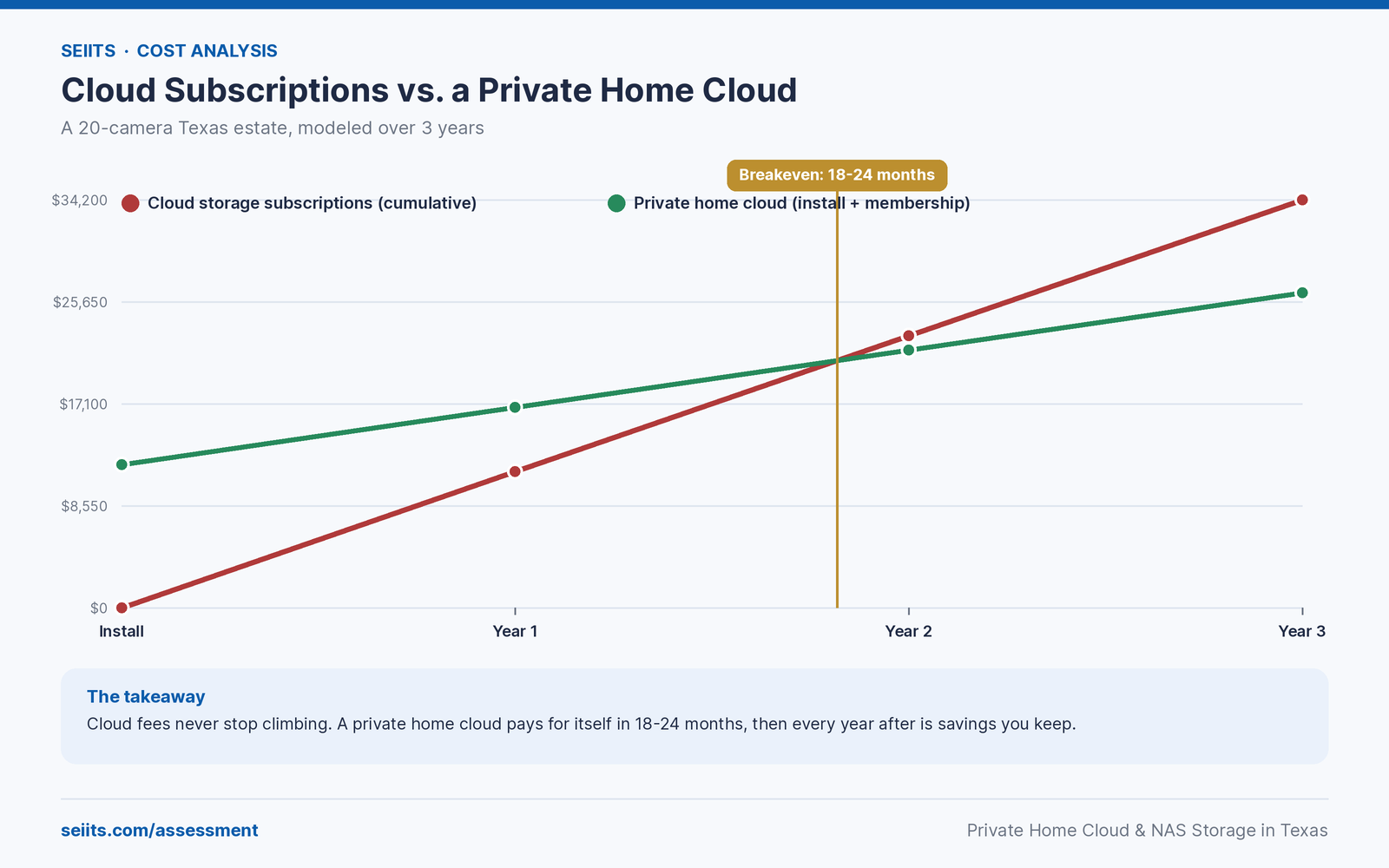
Quick answer: A professionally installed and configured private home cloud in Texas costs $3,000-$15,000 depending on storage capacity, camera integration scope, and network infrastructure requirements. Annual managed maintenance through Seiits's membership runs $2,400-$4,800. That compares against $4,800-$14,400 per year in cloud storage subscriptions for the same data volume - with no data ownership, no privacy controls, and no professional response when something fails.
The cost comparison that matters most for Texas estate owners: a 20-camera 4K surveillance system at standard cloud storage rates costs $8,400-$14,400 per year in cloud fees alone, based on current pricing from major providers. A professional QNAP NAS storage system with 80TB of redundant capacity handles the same footage indefinitely for a one-time hardware cost of $7,000-$12,000. Within 18-24 months, the private home cloud has paid for itself. After that, every year is net savings - plus full data ownership that cloud subscriptions never deliver.
Why a Consumer NAS Is Not a Private Cloud - and What Hardening Actually Means
Quick answer: Buying a Synology or QNAP NAS drive from Amazon and plugging it in is not the same as having a private home cloud. An unconfigured NAS with default credentials, vendor relay services enabled, and no firmware update schedule is an internet-exposed network drive. Professional hardening disables vendor cloud routing, configures VPN-only remote access, enables hardware encryption, sets up automated SMART monitoring, and establishes a firmware update schedule. That is the difference between a hobby device and infrastructure.
Kaspersky's threat research documents that major home NAS brands - QNAP, Synology, and Asustor - have all been targets of coordinated ransomware campaigns. The attack vector in most cases is identical: the device was connected to the internet via the manufacturer's relay service (QuickConnect, myQNAPcloud) with weak or default credentials, running outdated firmware with known vulnerabilities. The homeowner thought they had a private cloud. They had an open door.
The hardening steps that separate a consumer install from a professional one:
- Disable manufacturer cloud relay services: QuickConnect (Synology) and myQNAPcloud (QNAP) route your traffic through vendor servers. Remote access should go through a VPN on your home network, not through a third-party relay. We configure WireGuard or OpenVPN on your router for direct encrypted access.
- Enforce two-factor authentication on all NAS accounts: default admin accounts with password-only access are the primary breach vector. Every account on every Seiits-managed NAS has 2FA enforced - no exceptions.
- Enable hardware AES-256 encryption: data at rest on the drives is encrypted at the hardware level. If a drive is physically removed from the enclosure, it is unreadable without the encryption key stored separately.
- Automated firmware update schedule: NAS manufacturers release security patches regularly. A device running 18-month-old firmware is running against a public list of known vulnerabilities. Our managed service handles updates on a tested schedule - not ad hoc.
- Immutable snapshots: daily point-in-time snapshots of all storage pools stored on a separate volume. If ransomware encrypts the primary data volume, we restore from an immutable snapshot rather than paying a ransom or losing the data.
Network segmentation: the NAS lives on a dedicated VLAN (Virtual Local Area Network) separate from IoT devices, guest networks, and general browsing traffic. A compromised smart home device cannot reach the NAS. This requires coordination with your home network infrastructure - which is why this is a whole-home project, not a standalone device install.
From the field: Most homeowners who call us about a NAS setup have already purchased a device. In almost every case, the manufacturer's cloud relay service is enabled and the admin account is using a weak password. The device has been internet-accessible since the day it was installed. We harden the existing unit if it is recent enough, or replace it if the firmware line is end-of-life. Starting with a properly configured device from day one is always cheaper than cleaning up a compromised one.
Texas City Guide: Private Home Cloud Considerations by Market
Dallas - Fort Worth
DFW is our highest-volume market for private home cloud installations. The pattern in Highland Park, University Park, and Southlake is consistent: homes with full Crestron or Control4 integration, 15-30 security cameras, and an estate manager who needs reliable access to footage and household records from multiple locations. These homes do not have a storage problem - they have a data management problem. 14TB of unorganised footage across three different cloud services is not an archive. It is chaos with a subscription attached.
The specific challenge in pre-2000 Highland Park and University Park builds is network infrastructure. Many of these homes were wired with 100Mbps Cat5 in their original construction or renovation. A QNAP NAS storage system writing 4K footage from 20 cameras requires a minimum of 1Gbps internal network connectivity to avoid dropped frames and buffering during simultaneous access. We run Cat6A or fibre between the NAS and the primary network switch as part of every installation in these markets. Our Wi-Fi 7 and luxury home networking guide covers the full network infrastructure picture for homes that are building private cloud infrastructure on top of a legacy wiring plant.
Houston
Houston's private home cloud requirements are driven by multi-property estate management. River Oaks and Memorial homeowners frequently own 2-3 properties simultaneously - a primary residence, a ranch or lake house, and often a residence in a second city. A professionally configured QNAP or Synology NAS with encrypted offsite replication handles all three properties from a single managed system. Each property has a local NAS node; data replicates to the primary estate's server nightly, giving a single point of truth for all footage, documents, and media.
Houston's humidity is also a hardware consideration I raise with every client in this market. NAS equipment needs climate-controlled installation - not in an outdoor equipment closet, not in an attic, not in a garage that hits 120 degrees in July. The standard Seiits installation in Houston places the NAS in a dedicated equipment rack in a temperature-controlled utility room or server closet, with proper airflow, UPS (uninterruptible power supply) protection, and surge suppression on the power line.
Austin
Austin's market skews toward homeowners who are already technically engaged - energy sector executives, tech company founders, and investors who understand the value of data sovereignty because they deal with it professionally. The conversation in Barton Creek and Westlake is less about convincing someone that a private home cloud is worthwhile and more about designing a system that matches their existing security posture. These clients often arrive with specific requirements: end-to-end encryption, air-gapped backup drives, VPN-only remote access, and documented access control policies they can show to their corporate security team.
Austin clients frequently ask about integrating their private home cloud with their broader smart home security setup. Our smart home integration planning guide for Texas architects and new construction covers how private home data infrastructure connects with surveillance systems, access control, and whole-home automation at the pre-construction planning stage - where the infrastructure decisions cost the least to make correctly, alongside the questions worth asking any integrator before construction begins.
Project Reference: Private Home Cloud Build in Southlake, DFW
Home: 7,400 sq ft primary residence in Southlake. Three adults, two household staff with managed access requirements. Existing setup: 22 security cameras writing to a mix of cloud services and local SD cards, approximately 9TB of family photos and videos across Google Photos, iCloud, and an ageing external drive. Financial documents stored in a personal Dropbox account shared with an estate attorney.
What Seiits designed and installed:
- Primary NAS: Synology DS1823xs+ (8-bay, 10GbE) with 8x Seagate IronWolf Pro 12TB drives in RAID 6 configuration - 72TB raw, 48TB usable, two-drive fault tolerance
- Camera integration: 22 cameras redirected from cloud storage to write directly to a dedicated camera surveillance volume on the Synology - full 4K footage retained at 90 days, motion-event footage at 12 months
- Media consolidation: 9TB of family media migrated from three cloud services, organised and indexed using Synology Photos with facial recognition running locally
- Document archive: estate documents migrated from shared Dropbox to an encrypted volume with attorney-specific access credentials and audit logging
- Offsite backup: nightly encrypted replication to a private S3 bucket in a separate AWS region - disaster recovery in the event of physical damage to the primary site
- Network hardening: vendor relay services disabled, WireGuard VPN configured on Ubiquiti gateway for secure remote access, NAS on dedicated VLAN, 2FA enforced on all accounts
- UPS protection: APC Smart-UPS 1500VA on the NAS rack - 45-minute runtime during power outages before graceful shutdown
Results after 90 days:
- Cloud storage subscription costs eliminated: $847/month in combined Google One, iCloud, and Dropbox Business fees - $10,164 per year returned to the estate
- Security camera footage: all 22 cameras writing to local NAS storage with zero cloud routing - footage accessible only on the home network or via authenticated VPN
- Staff access: estate manager and household coordinator have dedicated accounts with scoped access - they can reach their relevant folders, not the full archive
- System status: zero unplanned downtime in 90 days. Two SMART drive warnings flagged by monitoring within 30 days of install - both drives replaced proactively before failure
“We had no idea we were paying over $800 a month to store our own data on someone else's server. The new system is faster, everything is in one place, and I stopped worrying about what happens if Google decides to change their terms of service again.” - Homeowner, Southlake TX
Frequently Asked Questions: Private Home Cloud and NAS Storage in Texas
These are the questions that come up most often in Seiits intake assessments across DFW, Houston, and Austin. If your situation is not covered here, book a free data assessment at seiits.com/assessment - we review your current storage setup, identify your risks, and design a system that fits your actual workload.
What is a home NAS and how is it different from a personal cloud?
A home NAS (network attached storage) is a multi-drive device on your home network that stores files locally. A private home cloud is a NAS configured to replicate cloud functionality - remote access, photo management, camera footage retention, document backup - without routing data through third-party servers. Every Seiits home data installation in Texas is both: a $3,000-$15,000 NAS system running cloud-equivalent software, entirely under your roof and under your control. Synology and QNAP are the two platforms we deploy across Dallas, Houston, and Austin.
Is a home NAS secure enough for sensitive financial documents and estate records?
A professionally hardened NAS with AES-256 encryption, VPN-only remote access, and immutable snapshots is more secure than a shared Dropbox or Google Drive for sensitive estate documents. Kaspersky research shows improperly configured home NAS devices are active ransomware targets. A Seiits-managed system disables vendor relay access on day one, enforces 2FA, runs encrypted offsite backups at $2,400-$4,800 per year in managed maintenance, and monitors drive health continuously for Highland Park, River Oaks, and Westlake clients.
How much QNAP NAS storage do I need for a Texas home with 20+ security cameras?
A 20-camera 4K system generates 1.5-2TB of footage per day. At 90-day retention, that requires 135-180TB usable storage. With RAID 6 on a QNAP NAS storage system, you need 200-240TB raw capacity - achievable with a dual 12-bay system at $8,000-$14,000 hardware, plus $3,000-$5,000 installation and hardening. That compares against $14,400 per year in cloud storage fees for the same footage volume across Dallas or Houston properties.
What is the difference between Synology and QNAP for a home private cloud in Texas?
Synology's DSM is more polished and easier for estate managers without technical training - the right choice for most Texas estate clients. QNAP offers stronger hardware performance, wider 10GbE coverage at mid-range prices, and ZFS support through QuTS hero for enterprise-grade data integrity. For homes requiring more than 100TB usable or running many simultaneous 4K camera streams in Houston or DFW, QNAP is the better platform. The Seiits assessment determines the right platform before any hardware is purchased.
Can I keep a copy of my data in the cloud as well as on a home NAS?
Yes - and you should. The 3-2-1 backup strategy: one copy on your home NAS, one local backup drive, one encrypted offsite copy in a private S3 bucket you own. The offsite copy is encrypted before leaving your home and inaccessible to the cloud provider - disaster recovery only, not working file storage. Seiits configures all three tiers as part of every home data installation across Dallas, Houston, and Austin, with automated nightly replication and monthly restore testing.
How long does a private home cloud installation take in DFW or Houston?
A standard entry-tier installation - 4-bay Synology with camera integration and basic hardening - takes one full day. An 8-bay system with multi-property replication, Plex media server configuration, and full network segmentation typically takes two days. Large-estate rack systems with 12+ bays, dual-unit replication, and custom access control policies for multiple staff users run 3-4 days. Seiits provides same-day assessment visits across DFW and Houston, and all installations include a full documentation handoff and staff orientation before we leave the property.
Does Seiits manage the home NAS after installation or is it a one-time setup?
Seiits provides ongoing managed maintenance through membership tiers: firmware updates on a tested schedule, continuous SMART drive health monitoring, storage capacity reporting, offsite backup verification, and priority same-day response when an issue is flagged. Annual managed maintenance costs $2,400-$4,800. An unmanaged NAS running outdated firmware in a Highland Park or River Oaks home is an active exposure - TechTarget confirms storage systems are among the most targeted infrastructure in 2026 ransomware campaigns.
Your Data Belongs Under Your Roof. Here Is How to Start.
If you are paying more than $200 per month across cloud storage subscriptions, have security camera footage routing through vendor servers, or store financial documents in a shared cloud account - you have the wrong infrastructure for the level of data you are generating and the level of privacy your estate requires.
A private home cloud from Seiits is not a tech project. It is an infrastructure decision, handled by the same team that manages your home networking, security system, and automation platform. We design the system, install it, harden it, document it, and manage it on an ongoing basis. When a drive shows a SMART error at 3am, we get the alert - not you.
Comments ()